How to Use ServiceNow as Your Interface for Stonebranch Universal Automation Center
ServiceNow is the IT service management (ITSM) hub for many enterprises worldwide. It’s where business users submit requests, service desk teams manage incidents, and operators spend much of their day. At the same time, Stonebranch Universal Automation Center (UAC) orchestrates the enterprise workflows that keep applications, infrastructure, and business services running.
The Stonebranch UAC self-service integration for ServiceNow brings the two worlds together by enabling ServiceNow to serve as the frontend for Universal Automation Center. Instead of switching applications, authorized users can create, launch, schedule, and manage UAC tasks from the ServiceNow environment.
Universal Automation Center remains the enterprise automation platform, responsible for orchestration, governance, scheduling, security, and execution. The ServiceNow self-service integration extends those capabilities into the ITSM platform where service desk teams, application owners, SAP administrators, and operations teams already work.
The result is a simpler way for less-technical end users to interact with enterprise automation through a platform they are already comfortable using.
Key Takeaways
- The ServiceNow self-service integration enables users to create Linux, Windows, SQL, and SAP tasks in UAC, while remaining in the ServiceNow platform.
- Orchestration, governance, security, and execution stay in Stonebranch Universal Automation Center (UAC) while end users work in ServiceNow.
- Operations users can release, rerun, and force-finish task instances from ServiceNow.
- When a UAC task fails, UAC can automatically generate an incident ticket in ServiceNow.
- The Stonebranch integration is ServiceNow-certified, available in the ServiceNow Store.
How It Works
When you use Universal Automation Center for enterprise automation, it orchestrates workflows across applications, infrastructure, cloud platforms, enterprise systems, and business services while enforcing the governance and operational controls organizations depend on.
The UAC self-service integration for ServiceNow doesn’t change that model — it extends it.
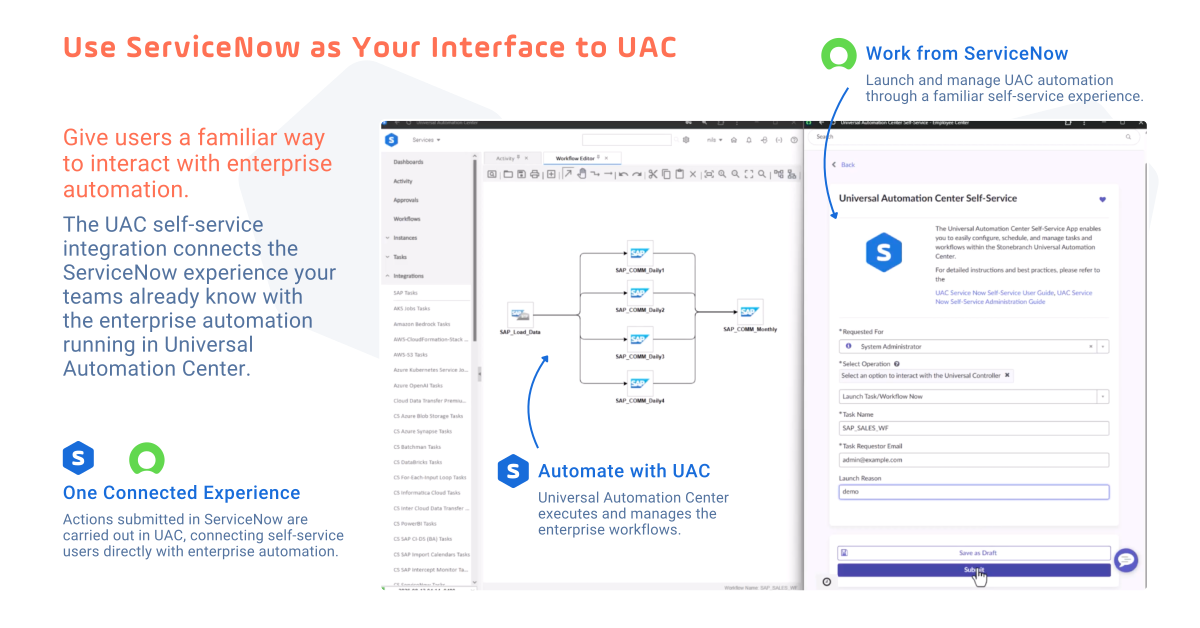
Instead of requiring every user to learn Universal Controller, the application gives authorized users a simplified way to interact with Universal Automation Center by using the ServiceNow interface they’re already familiar with.
From ServiceNow, users can direct UAC to:
- Create Unix, Windows, SQL, and SAP tasks.
- Launch UAC tasks and workflows immediately.
- Schedule ad-hoc task launches.
- Hold task instances.
- Release held task instances.
- Halt and force finish running task instances.
- Force finish task instances.
- Rerun failed task instances.
Whether a user is rerunning a failed task or provisioning a new SAP job, ServiceNow provides the self-service automation experience while UAC executes the requested work.
Use Cases for the ServiceNow + UAC Self-Service Experience
Organizations can use the ServiceNow self-service integration in two primary ways: managing existing automation and creating new automation. The examples below demonstrate how ServiceNow can provide a familiar interface for different stages of the automation lifecycle, while UAC executes the requested work.
1. Managing Existing Automation: Day-to-Day UAC Operations Using ServiceNow
In day-to-day operations, users may need to respond to changing conditions, such as releasing a held task or rerunning an execution after its underlying issue has been resolved.
The UAC self-service integration makes these operational actions available directly within ServiceNow. For example, an authorized operations user can release a held task, rerun a failed task, or force-finish a task instance without leaving the ServiceNow app.
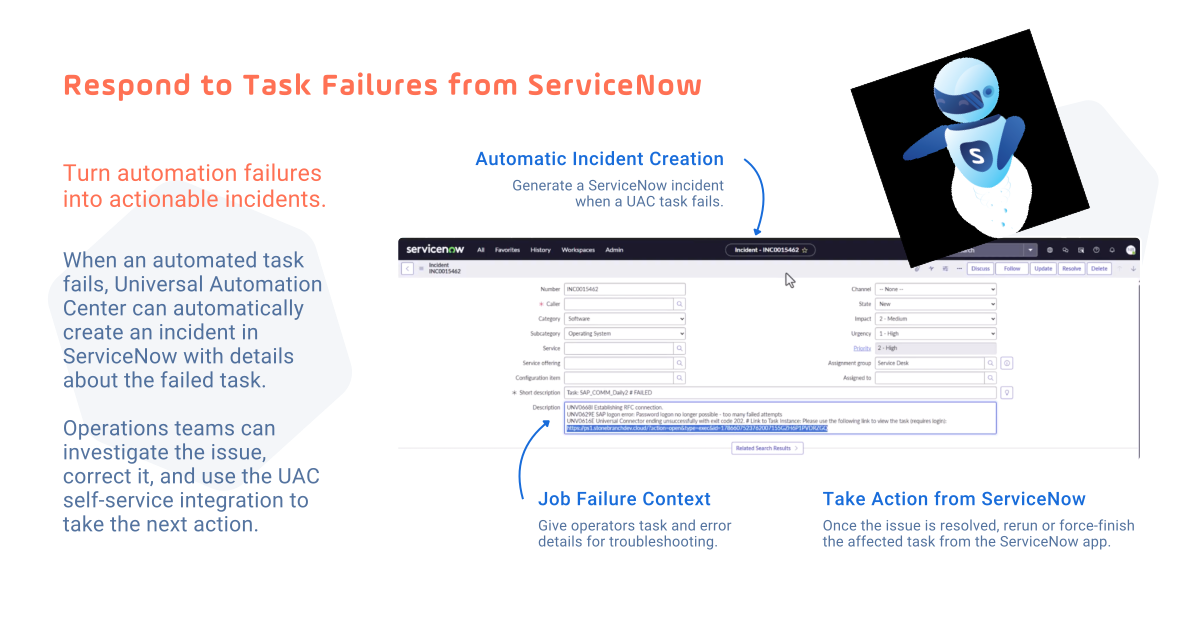
The integration also connects these operational actions with incident management. When a task fails, UAC can automatically generate an incident ticket in ServiceNow. An operator can investigate the issue and then take the appropriate action on the UAC task from ServiceNow.
2. Creating New Automation: Set Up an SAP Task in ServiceNow
From ServiceNow, a user can create a new SAP task in UAC, define multiple ABAP job steps, configure the schedule, and submit the request — all without opening UAC.
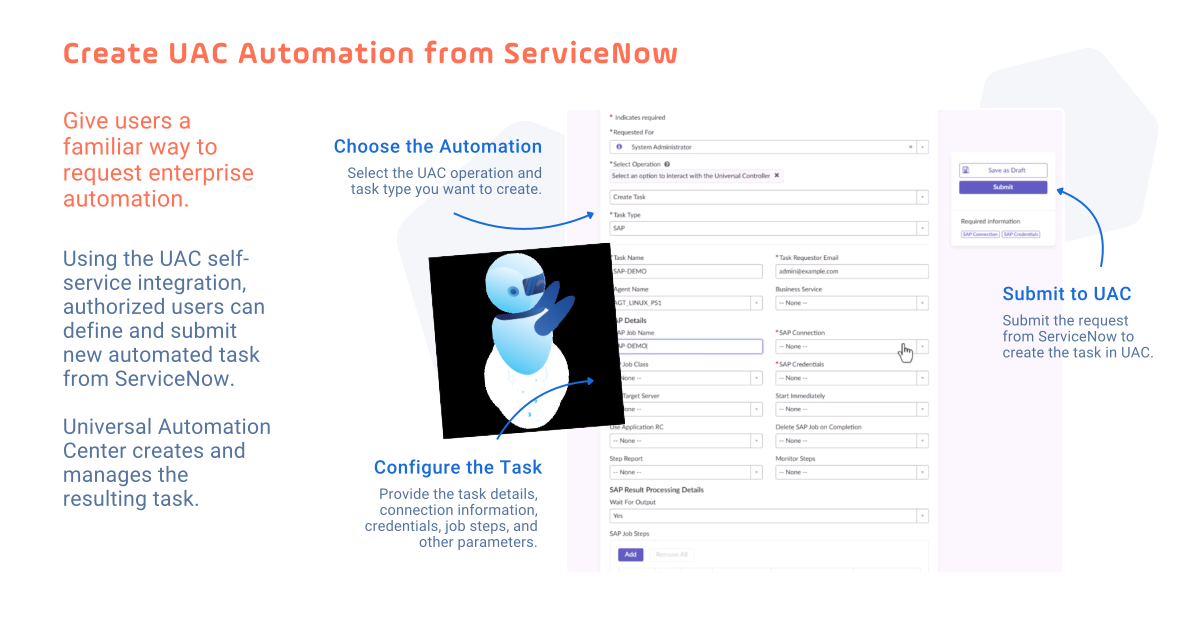
Once the request is submitted in ServiceNow, Universal Automation Center creates the SAP task and its associated trigger, maintaining the automation definition exactly as it would if submitted directly within UAC.
A key benefit of using ServiceNow as the self-service interface is that organizations can configure an approval workflow before the request proceeds to create the SAP task and its associated trigger in UAC.
Want to see how it works?
Watch the demonstration below to see the ServiceNow self-service integration in action.
The demo shows an SAP task being created and scheduled through ServiceNow, followed by operational examples in which an operator releases a held task and responds to failed tasks.
Because the SAP task is created in Universal Automation Center, it becomes part of the same automation environment, governance model, and operational processes as other UAC workflows. Business users and application teams get a familiar way to request automation, while automation teams retain centralized control of the resulting UAC objects.
Making Enterprise Automation More Accessible
Available in the ServiceNow Store, the UAC self-service integration extends the reach of Universal Automation Center by making enterprise automation available through the ServiceNow experience your teams already use every day.
The Stonebranch integration is ServiceNow-certified. Installation and user documentation are also available from the ServiceNow Store.
It’s a practical way to put automation in the hands of more authorized users while keeping UAC at the center of enterprise automation.
Want to learn how Stonebranch integrates with ServiceNow beyond self-service automation? Explore our overview of the ServiceNow event and incident integrations to automate event management, incident response, and end-to-end ITSM workflows.
Frequently Asked Questions
What is the UAC self-service integration for ServiceNow?
The ServiceNow-UAC self-service integration extends the power of Stonebranch UAC into the ServiceNow experience, allowing authorized users to create, launch, schedule, and manage UAC tasks from the ServiceNow interface while UAC continues to execute the underlying automation.
What can users do from ServiceNow?
Business users can create Linux, Windows, SQL, and SAP tasks. For SAP, they can create jobs with multiple ABAP steps and configure a schedule. Operations users can also interact with existing task instances, including releasing, rerunning, and force-finishing tasks.
Can UAC create ServiceNow incidents when a task fails?
Yes. UAC can automatically generate an incident ticket in ServiceNow when a task fails. Operators can investigate the incident and then use the ServiceNow app to take the appropriate action on the affected UAC task.
Can organizations add an approval process to self-service requests?
Yes. For the SAP task creation scenario shown in the demonstration, an approval flow can optionally be configured in ServiceNow before the SAP job and trigger are created in UAC.
Does ServiceNow replace Universal Automation Center?
No. Universal Automation Center remains the enterprise automation platform responsible for orchestration, scheduling, execution, governance, and security. ServiceNow gives authorized users another interface to perform supported self-service and operational actions.