
Stonebranch Product
BatchMan SAP Workload Automation
SAP-Native Job Scheduling Orchestration
SAP job scheduling doesn’t have to be complex. Replace time-based SM36 and SM37 with BatchMan, an SAP-native job scheduler that automates, monitors, and simplifies business-critical background jobs across SAP ECC and SAP S/4HANA environments.
SAP-Native Automation and Control with a
Familiar SAP Look and Feel
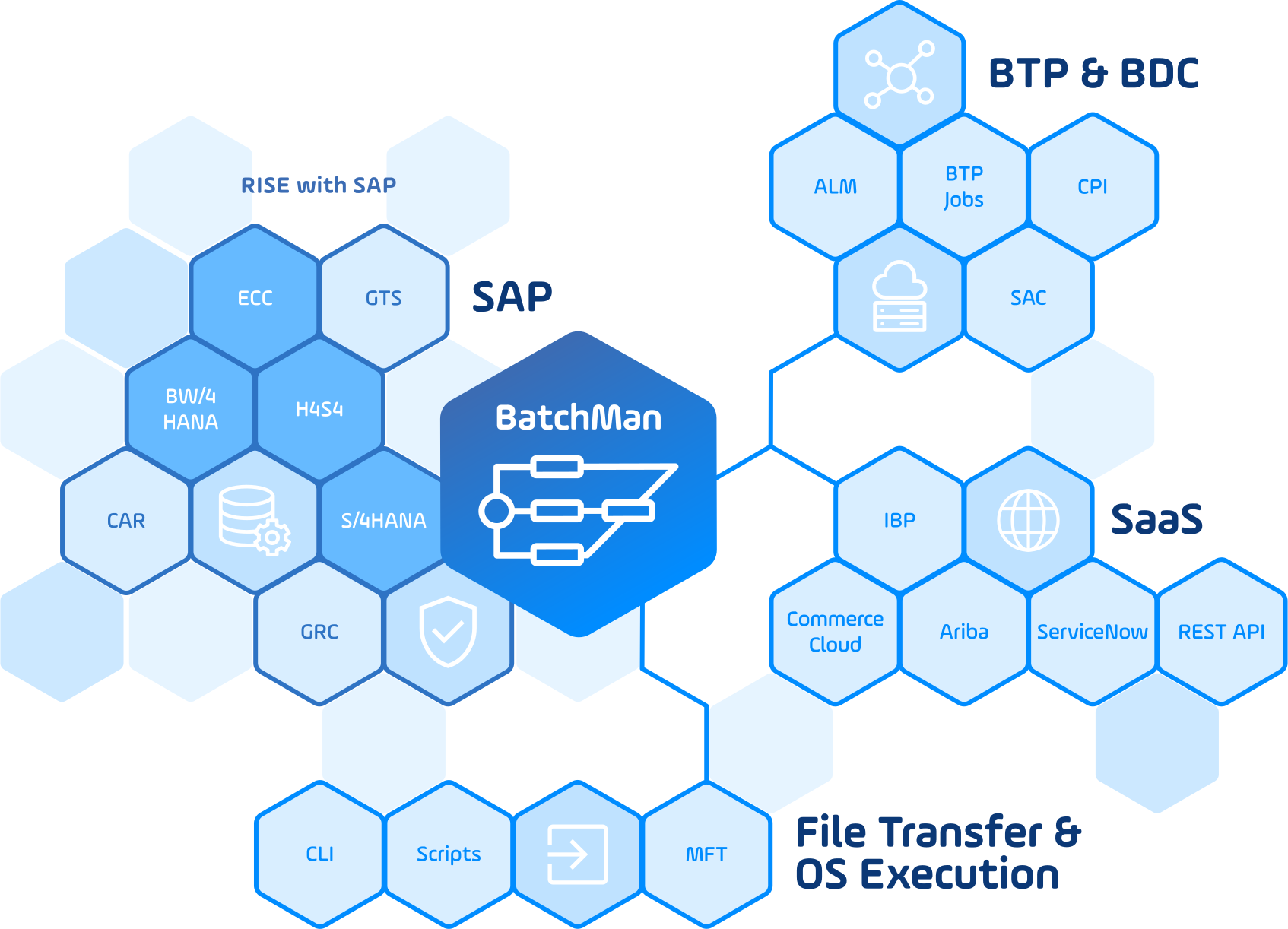
BatchMan automates and monitors business-critical processes directly from within SAP. Running in the ABAP stack of SAP ECC, SAP S/4HANA, and RISE with SAP, BatchMan securely controls SAP and non-SAP control processes without separate hardware or additional software.
The result is a seamless integration into existing SAP landscapes, with greater visibility, reliability, and control over hybrid business process automation.

Advantages of BatchMan

Up to 80%
Faster Processing
Automate recurring background processes in real time and significantly speed up SAP job execution.

Less Manual
Work
Reduce manual interventions by automating repetitive tasks across business-critical SAP processes.

Ready Within
One Day
Deploy BatchMan quickly and start automating SAP jobs with minimal setup effort.

Monitoring and
Alerting
Keep every process in view with built-in monitoring, alerts, and centralized job control.

Fewer Job
Errors
Reduce risks with comprehensive job checks that help prevent errors before they impact operations.

Rapid Adoption,
Same SAP User Interface
BatchMan becomes an embedded solution within SAP that looks and feels exactly like the SAP interface.
Central Automation of Business Processes in SAP S/4HANA
BatchMan simplifies complex SAP job scheduling by automating and monitoring business-critical processes directly from within SAP. Running natively in the SAP ABAP stack, BatchMan centrally controls SAP, non-SAP, and cloud processes while maintaining end-to-end visibility across hybrid system landscapes.
Central Control of Hybrid System Landscapes
- Embed automation deeply into SAP with native ABAP integration.
- Control and monitor processes across SAP ECC, SAP S/4HANA, and RISE with SAP.
- Improve reliability with failover and switchover functionality.
- Document processes directly in SAP Solution Manager.
- Secure data transports with integrated file backup functionality.
- Manage access through SAP roles and authorization controls.
- Monitor and control processes from a single central point.
- Connect SAP and non-SAP systems for end-to-end automation.
- Integrate SOAP services and REST APIs for flexible process control.
Automate End-to-End SAP Business Processes
BatchMan helps SAP teams schedule, monitor, and control dependent process chains across SAP modules, standard processes, and system landscapes — directly from within SAP.

SAP IT Operations
Automate SAP technical operations across SAP Basis administration including:
- System administration
- Technical operations
- SAP background jobs
- Monitoring and process documentation
Example SAP processes: SAP background jobs, BW chains and info packages, system monitoring, batch input sessions, IDoc monitoring, spool evaluation, and job log evaluation.

Finance and Accounting
Support finance-related process chains across SAP SD, FI, CO, GL, AA, AP, and AR, including:
- Order-to-cash
- Procure-to-pay
- Record-to-report
Example SAP processes: payment runs, dunning runs including F150, asset accounting processes like financial closing tasks, recurring reports, and archiving actions including SARA.

Supply Chain and Logistics
Coordinate supply chain processes across SAP PP, MM, SD, EWM, APO, and IBP, including:
- Plan-to-deliver
- Forecast-to-fulfill
- Procurement, warehouse, availability, and fulfillment workflows
Example SAP processes: MRP runs (including MD01), ATP-related processes (e.g., availability checks via CO06, process backorders), SAP IBP automation, and high-volume supply chain background jobs.

Human Resources and Payroll
Automate HR and payroll-related process chains across SAP HCM, PA, PY, and PT, including:
- Hire-to-retire
- HR administration
- Time management
- Payroll operations
Example SAP processes: payroll runs, payroll follow-up activities, remuneration statements, payslip generation, and recurring HR background jobs.

Asset and Maintenance Operations
Support asset lifecycle and maintenance-related process chains across SAP AA, FI-AA, PM, EAM, and PS, including:
- Acquire-to-retire
- Design-to-maintain
- Issue-to-resolution (service management)
Example SAP processes: technical order completion, schedule maintenance plans, and create service orders.

Product and Project Processes
Coordinate product, project, and lifecycle-related process chains across SAP PLM, PS, and MM, including:
- Idea-to-market
- Product lifecycle workflows
- Project system processes
- Material-related processes
Example SAP processes: product lifecycle jobs, project system jobs, material-related updates, and dependent background processes.
BatchMan Supports Standard SAP Processes

BW
Chains
Centrally execute SAP BW chains and info packages with integrated recovery features for reliable operation.
Archiving
Actions
Schedule archiving actions for objects, including SARA, with integrated load balancing for efficient processing.

Dunning
Run
Automate dunning runs, including F150, and manage payment parameter adjustments with greater reliability.
Payroll
Processing
Automate and monitor SAP payroll runs; and related follow-up activities, including remuneration statements and payslip generation, with support for parallel processing and scheduling.

SAP ATP
Processing
Schedule and monitor ATP-related processes for availability checks (CO09), order confirmation, and supply planning across SAP sales and production processes.
Want to See More?
Schedule a demo and watch BatchMan handle your SAP workload automation needs.
Process Maintenance in BatchMan
BatchMan provides extensive options for defining scheduling criteria, start conditions, calendars, resource allocations, dependencies, and error-handling rules directly within SAP.

System-Wide Control Over SAP Job Scheduling
Combine any number of cross-system jobs into a single process and model dependencies exactly as needed. With graphical modeling and list views, BatchMan makes it easy to design, maintain, and control complex SAP job schedules while staying aligned with the familiar SAP look and feel.

Consistent Traceability of Process Changes
Maintain a clear record of process changes with dedicated change history and archiving. BatchMan supports transparency and traceability to help meet modern compliance requirements.

Process Control and Alerting
Keep processes under control, even when errors occur. BatchMan triggers alerts and provides options to resolve issues automatically, including recovery jobs that fix errors without interrupting downstream tasks. Error-handling criteria can be defined during process planning to reduce manual intervention.
Stonebranch Success Stories
Hear More From Enterprises Like Yours

“Stonebranch brings business processes and technical implementation closer together again, makes process flows more transparent, and ultimately contributes to better mutual understanding between IT and business.”
- Hema Cherukuri, Senior Manager IT SAP Basis, PUMA

“The project was completed in just three months. Particularly impressive was the support from Stonebranch, which responded quickly and provided a solution in the form of a transport order.”
-Arianit Zogu, SAP-Basis Manager, Rotkäppchen-Mumm

“Stonebranch offers us everything: We can track over two million job runs per month in a single SAP system. With the start of the SAP S/4HANA offensive, we also want to modernize our system landscape, which has grown over decades.”
-Angela Tischhöfer, Head of IT Operations, Würth IT
Extend BatchMan with the File Transfer Add-On
Connect SAP jobs with non-SAP process steps by adding secure file transfer, script execution, and web service integrations to BatchMan-managed schedules.
Move Files
Securely transfer and monitor files across SAP and non-SAP systems using protocols such as SFTP, FTPS, and local directories. File movements can be included in BatchMan process chains with central visibility and alerting.
Run Scripts
Execute shell, PowerShell, or batch scripts as part of SAP-centered process flows. Trigger follow-up steps based on file events, process status, or scheduling criteria.
Execute REST and SOAP Web Services
Call REST and SOAP web services directly from automated process chains to connect SAP jobs with external applications, APIs, and business systems.
Additional Tools in BatchMan
Batch Input
Automatically import, monitor, and trigger alerts for batch input sessions.
IDoc Monitoring
Automate IDoc processing and respond to errors in real-time.
Spool and Logs
Evaluate spools and job logs, trigger alerts, and adapt processes as needed.
Multiprint to PDF
Combine, convert, and send spool output as PDF documents.
Monitoring in BatchMan
BatchMan Monitoring gives SAP teams a complete overview of planned, scheduled, and running processes at any time. From a single monitoring interface, users can adjust job planning schedules, access detailed process information, and switch directly to the graphical process view.

Reporting and Mass Changes
Analyze existing processes, leverage comprehensive reporting options, and make adjustments when needed. BatchMan supports mass changes, helping teams efficiently update settings across multiple jobs, process chains, and schedules.

Direct Process Access and Error Handling
Keep an eye on your processes in real-time. From the BatchMan monitor, users can modify processes, access logs and runtime information, switch to the graphical process view, and analyze, fix, confirm, or comment on errors.
Explore SAP Automation Use Cases
See how BatchMan helps SAP teams automate specific business-critical processes directly from within SAP. Explore dedicated use cases for payment runs, MRP runs, IS-U mass activities, and SAP IBP automation.

Get More Info on BatchMan SAP Job Scheduling



Individual consultation and support.

SAP certified and tested.

Return on investment (ROI) within a very short time.
Expand from SAP-Native Automation to Enterprise Service Orchestration

Orchestrate What’s Next
From SAP-native automation with BatchMan to enterprise-wide service orchestration with Stonebranch Universal Automation Center.
Connect critical workflows across IT, cloud, data, DevOps, and business applications from a single control plane built for real-time automation.