Orchestrated Managed File Transfer: Why MFT And Workload Automation Make the Perfect Pair
From data flows to workflows, managed file transfer (MFT) and workload automation (WLA) work together to orchestrate real-time data transfers between any environment, both internal and external to your network.
In most enterprises, a file arrival marks the start of a process: a payment batch is posted, a claim is validated, a supply chain update is reconciled, or customer data is ingested downstream. When managed file transfer tooling is disconnected from automation, teams end up with manual handoffs, brittle schedules, and one-off scripts.
Orchestrated MFT brings together two mission-critical practices at the heart of every enterprise: managed file transfer and workload automation software. Because business success depends on collaboration and connected systems, organizations need a reliable way to link data points, people, and processes. And they need to do this across internal teams as well as external trading partners and other B2B providers.
Let’s explore why MFT pairs so well with WLA and why enterprises are moving to a combined MFT/WLA platform.
Key Takeaways
- Managed file transfers (MFT) are often the starting point of critical business processes — not the end.
- According to the 2026 Global State of IT Automation report, 90% of organizations integrate MFT into automated workflows, but integration depth varies (fully vs. partially integrated).
- Orchestration-first MFT connects file transfer, decisioning, workflow execution, and recovery into a single governed process.
- The best tools to integrate workload automation with MFT support event-driven triggers, unified monitoring, and audit-ready controls.
- A combined file transfer workload automation solution reduces manual steps, brittle scripts, and operational risk by connecting managed file transfer to downstream workflows.
- Hybrid IT and B2B partner ecosystems make observability, governance, and resiliency non-negotiable.
What is MFT File Transfer
Managed file transfer is a type of enterprise-grade software or service that moves data from one system to another over a computer network. MFTs offer advanced capabilities, security, and control while also enabling multiple file transfer protocols like FTP, FTPS, SFTP, HTTP, HTTPS, and AS2.
Typical standalone file transfer software will:
- Centralize management of system-to-system file transfers.
- Check for errors and automatically remedy them.
- Provide encryption, role-based permissions, logging, and reporting.
- Integrate with commonly used tools and applications.
There are three common types of managed file transfers:
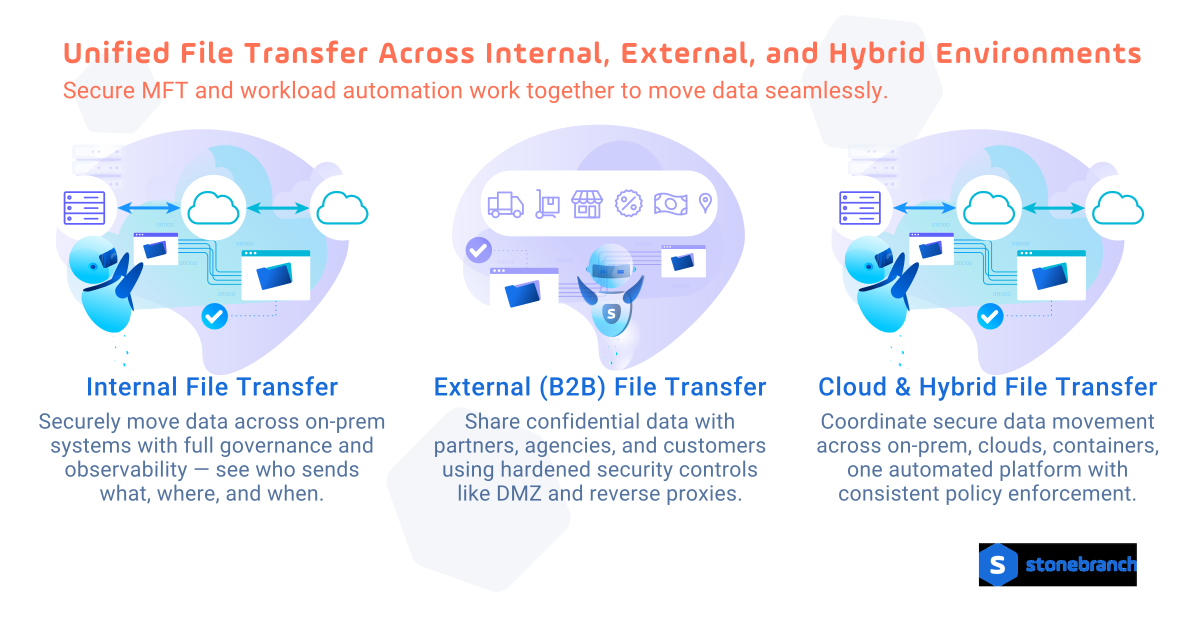
- Internal data transfers allow data to flow safely and smoothly across the many internal systems of a single enterprise’s on-premises network. System-wide governance and observability allow administrators to understand who is sending data, what data is being sent, where data is being sent, and when data is being sent.
- External B2B data transfers let multiple organizations share data across external networks, including business partners, government agencies, and customers. This data is often confidential, proprietary, or personally identifiable. In other words, 100% dangerous if it lands in the wrong hands. External transfers require extra security measures, such as reverse proxies and highly secure demilitarized zone (DMZ) protocols.
- Cloud and hybrid file transfers coordinate secure data movement across on-premises, cloud, containerized, and multi-cloud environments from a single managed file transfer (MFT) and automation platform—so teams can move data directly between object stores without intermediate staging, transfer files across container platforms like Docker and Kubernetes, design and manage workflows through a visual drag-and-drop interface, and maintain consistent security controls and policy enforcement everywhere data flows.
Standalone MFT tools centralize data movement, but they often function independently from the business processes that those transfers are meant to support.
What Is Workload Automation (WLA)?
Workload automation is the practice of using software to schedule, trigger, and manage automated IT tasks and business workflows.
Whether called job scheduling, batch processing, or a service orchestration and automation platform (SOAP), WLA:
- Manages job dependencies
- Supports event-based triggers
- Enforces SLAs
- Automates recovery and retries
- Provides centralized monitoring
If MFT improves basic file transfer tools, WLA extends automation across entire workflows. When integrated, file transfers become part of larger automated business processes.
How Do MFT and WLA Work Together?
Integrating MFT with a SOAP or WLA brings automation to your data transfers, giving you the option to orchestrate them in real-time and include them in broader business processes:
- Schedule file transfers within larger workflow automations, all from a single platform.
- Automatically trigger file transfers based on real-time system events or scheduled batches.
- Gain system-wide observability to understand who is sending data, what data is being sent, where data is being sent, and when data is being sent.
- Centrally manage, control, and monitor the movement of all data with reports and visual dashboards.
Why Integration Depth Matters
According to the 2026 Global State of IT Automation report, MFT is no longer an isolated utility. Most organizations have already connected file movement to automation. In fact, the 2026 report finds that 90% integrate MFT into automated workflows in some way (fully or partially).MFT is no longer an isolated utility. Most organizations have already connected file movement to automation. In fact, the 2026 report finds that 90% integrate MFT into automated workflows in some way (fully or partially).
But the important signal isn’t “integration exists.” It’s that the integration depth varies sharply. The report highlights a near-even split between fully integrated and partially integrated setups, revealing a clear maturity gap. Many teams have basic linkages in place (for example, a completed transfer triggers a downstream job), but they haven’t achieved true end-to-end orchestration across:
- file movement
- job execution and downstream dependencies
- exception handling and recovery
- governance, auditability, and unified monitoring
The next frontier is depth: treating MFT as a core orchestration component — not just a trigger — so teams get resilience, visibility, and control at scale (especially for hybrid and B2B transfers where compliance and reliability are non-negotiable).
Connected Isn’t Orchestrated: Governance Requires More Than a Trigger
Governance at scale is more than knowing the file arrived. It requires end-to-end control across the transfer and everything that depends on it: validation, downstream jobs, SLAs, exception handling, and audit trails.
When MFT is used as a simple trigger, visibility and policy enforcement fragment into silos.
When MFT and workload automation work together, teams get unified monitoring, consistent controls, and automated recovery, so compliance and reliability are built into the workflow — not chased after failures.
Unified WLA + MFT: Why it Matters
Many enterprises start with separate tools: one for MFT and another for WLA. Then they try to integrate them with scripts, plugins, or brittle handoffs. That approach can work on a small scale, but it often creates new failure points: split monitoring, inconsistent retries, duplicate credentials/policies, and unclear ownership when something breaks.
A unified WLA/SOAP and MFT solution treats file movement as a first-class automation capability. Instead of stitching systems together, you orchestrate transfers, downstream processing, and recovery from a single control plane, so teams gain stronger reliability, governance, and visibility across the entire file-to-process lifecycle.
What to Look for in a Unified Solution
When evaluating MFT and WLA/SOAP solutions — and how unified they really are — look for:
- Native orchestration (not bolt-on): Transfers should be defined, triggered, and governed inside the same workflow engine, not just via a separate console with loose callbacks.
- Event-driven and schedule-driven control: Support file arrival triggers, application programming interface (API) events, and SLA conditions alongside classic batch scheduling.
- Unified observability: Shared monitoring, logging, and status across transfers and workflows, with traceability from the partner endpoint, throughout the transfer, and along downstream tasks.
- Consistent security model: Central credential handling, encryption support, and policy enforcement that applies to both transfers and automated jobs.
- Built-in recovery patterns: Re-runs, escalations, alternate endpoints, and failovers should be configurable and reusable (not custom-coded).
- Reusable templates and governance at scale: Parameterized workflows with variable task types, standardized transfer profiles, and guardrails that allow teams to scale without losing control.
How WLA and MFT Work Together in Practice
Integrating MFT with WLA turns transfer activity into orchestrated workflows. Instead of treating file delivery as the end, you treat it as a trigger for what comes next: validation, routing, transformation, downstream processing, notifications, and reporting.
Common patterns enabled by orchestrated MFT include:
Event-Driven Ingestion (Partner or Internal)
Trigger → Transfer → Validate → Scan → Process → Notify
A file arrives from a trading partner, the workflow verifies integrity, applies security checks, routes to the right system, and automatically starts processing in ERP, a data platform, or payment systems.
Hybrid Routing (On-Prem to Cloud and Back)
Trigger → Transfer → Route → Launch cloud job → Confirm → Archive
Move data between on-prem systems and cloud storage, then orchestrate ETL/analytics jobs from the same workflow—without manual handoffs.
SLA Enforcement and Resiliency
SLA watch → Detect late/missing file → Retry → Failover → Escalate
If a file doesn’t arrive on time, trigger escalation, open a ticket, re-run with alternate endpoints, or fail over to a secondary site.
Governed Self-Service Sharing with Guardrails
Request → Policy check → Transfer → Audit log → Confirmation
Enable business users to initiate secure transfers while IT keeps centralized governance, access controls, and auditability.
The Practical Takeaway
Like containers and microservices, or CI and CD… It’s time to add MFT and WLA to your list of things that just belong together.
Because file transfers are embedded in most automated processes, the next step is ensuring they’re natively connected to workload orchestration. Organizations that move from partial integration to deep orchestration gain reliability, observability, governance, and operational resilience.
Together, MFT and WLA become an advanced automated file transfer capability. Universal Automation Center (UAC) unifies fully orchestrated internal MFT, external B2B MFT, and hybrid cloud data transfer solutions together, centralizing control of data flows and workflows alike.
Frequently Asked Questions
What is the best way to integrate WLA with MFT?
Choose a unified WLA and MFT solution where file transfers are a native part of the workflow engine (not a bolt-on). Look for event-driven file triggers, end-to-end orchestration, shared monitoring and audit trails, and consistent SLA, re-run, and failover handling across both transfers and downstream jobs.
What is a combined file transfer workload automation solution?
A combined MFT/WLA solution orchestrates secure file movement and the business steps that follow, including validation, routing, transformation, processing, notifications, and compliance reporting.
Why does integration depth matter?
Partial integration may trigger a single downstream job, while deep orchestration adds end-to-end observability, recovery patterns, and consistent governance across hybrid and B2B processes.
Start Your Automation Initiative Now
Schedule a Live Demo with a Stonebranch Solution Expert