Oracle Fusion Automation and Enterprise Orchestration with Stonebranch UAC
Learn how to automate Oracle Fusion ESS jobs, orchestrate cross-platform workflows, and simplify enterprise scheduling with Stonebranch UAC.
Oracle Fusion ESS (Enterprise Scheduler Service) can automate a lot of work inside Oracle. But what happens when an ESS job depends on something happening somewhere else first?
That’s common in processes like month-end close. Data comes in from SharePoint. A file transfer must complete successfully. A Snowflake pipeline must be completed before Oracle can move forward. A Power BI report must be prepared for the finance team. Then — finally — ESS generates the financial postings.
When none of these systems talk to each other, someone has to fill the gap: checking dashboards, sending emails, confirming upstream jobs finished, and manually kicking off the next step.
At that point, automating the ESS job only solves part of the problem.
The new Oracle Fusion ESS integration for Stonebranch Universal Automation Center (UAC) brings ESS jobs into broader enterprise workflows. Teams can schedule and automate Oracle Fusion ESS processes alongside the applications and data they depend on, without building custom API integrations or relying on mutual handoffs between systems.
Key Takeaways
- Oracle Fusion ESS jobs rarely run in isolation. They’re one step in a larger business process that spans multiple platforms.
- The same workflow can include tasks in Oracle, Snowflake, ServiceNow, Microsoft Fabric, managed file transfer, and even AI-powered decision logic.
- Triggers can come from anywhere: file arrival, task completion, AI agent, webhook, email, cloud event, or business application.
- The Stonebranch integration for Oracle Fusion ESS provides 120+ preconfigured processes so teams don’t have to build REST API calls from scratch.
- Monitoring, dependency management, and auditability are built into the integration, not bolted on.
- The Oracle Fusion ESS integration is already running in production at some of the largest Oracle Fusion deployments worldwide.
- Beyond ESS, Stonebranch also supports Oracle Integration Cloud, Oracle Analytics Publisher, Oracle HCM Flows, and Oracle Data Integrator (ODI) in the same workflows.
What Oracle Fusion ESS Actually Does
Enterprise Scheduler Service (ESS) is the job execution engine embedded in Oracle Fusion Cloud. It handles scheduling, running, and monitoring background processes across Oracle’s application suite: ERP, HCM, SCM, and beyond.
In practice, that covers a wide range of business-critical tasks:
- Finance: Generating accounting entries, closing ledgers, importing and reconciling transactions, running financial reports
- Human Capital Management: Payroll processing, workforce data updates, HR reporting cycles
- Procurement and Accounts Payable: Invoice imports, payment runs, supplier data jobs
- Supply Chain Management: Inventory updates, order processing jobs, planning runs
- General reporting: Scheduled outputs across modules that downstream systems and teams depend on
ESS handles both on-demand job requests and recurring scheduled processes. Jobs can be defined with parameters, chained with dependencies, and monitored in Oracle.
The limitation isn’t what ESS can do inside Oracle. It’s that ESS has no visibility into, or control over, what’s happening outside of Oracle. When a business process spans Oracle and a handful of other platforms, ESS can only manage its own part.
Oracle Fusion ESS In Only One Step in a Larger Process
Most organizations running Oracle Fusion aren’t running it in isolation. Snowflake, ServiceNow, SharePoint, Microsoft Fabric, Kubernetes, cloud storage — these are just a few of the systems contributing to business processes that cut across departments and platforms.
Running ESS jobs one at a time isn’t difficult. Keeping hundreds of them synchronized across multiple business systems, with proper dependency management, error handling, and visibility across the chain, is a different problem entirely.
The teams getting ahead of this have stopped thinking in terms of individual automated jobs. The ESS job is just one step; the business process around it is what actually needs to be automated.
How the Stonebranch Oracle Fusion ESS Integration Works
Oracle Fusion exposes REST APIs that support automation, but getting there usually requires custom development. Someone has to write the calls, handle authentication, manage errors, and keep everything maintained as Oracle updates over time.
The Stonebranch integration avoids that by providing 120+ preconfigured Oracle Fusion processes covering:
- Accounts Payable
- Accounts Receivable
- General Ledger
- Human Capital Management (HCM)
- Additional Oracle Fusion applications
These processes are built around the same terminology and parameters Oracle admins already understand. Rather than manually constructing API calls, an admin can select a process, fill in the familiar Oracle fields, and the integration handles the rest.
When scheduling Create Accounting, for example, UAC presents the same inputs available inside Oracle Fusion:
- Subledger Application
- Ledger
- Process Category
- End Date
- Additional Oracle-defined inputs
For organizations without customized ESS processes, administrators can extend the process mappings without touching the integration itself.
Once configured, a process can be triggered in whatever way the workflow calls for: calendar schedule, file arrival, task completion, email event, webhook, AI agent, cloud event, API call, or signal from another business application. Cross-platform dependencies are handled natively, too. As an example, an Oracle Fusion task runs only after the conditions you define are met, regardless of which system those conditions involve. When upstream steps fail, downstream Oracle jobs wait. When they succeed, the workflow moves forward automatically.
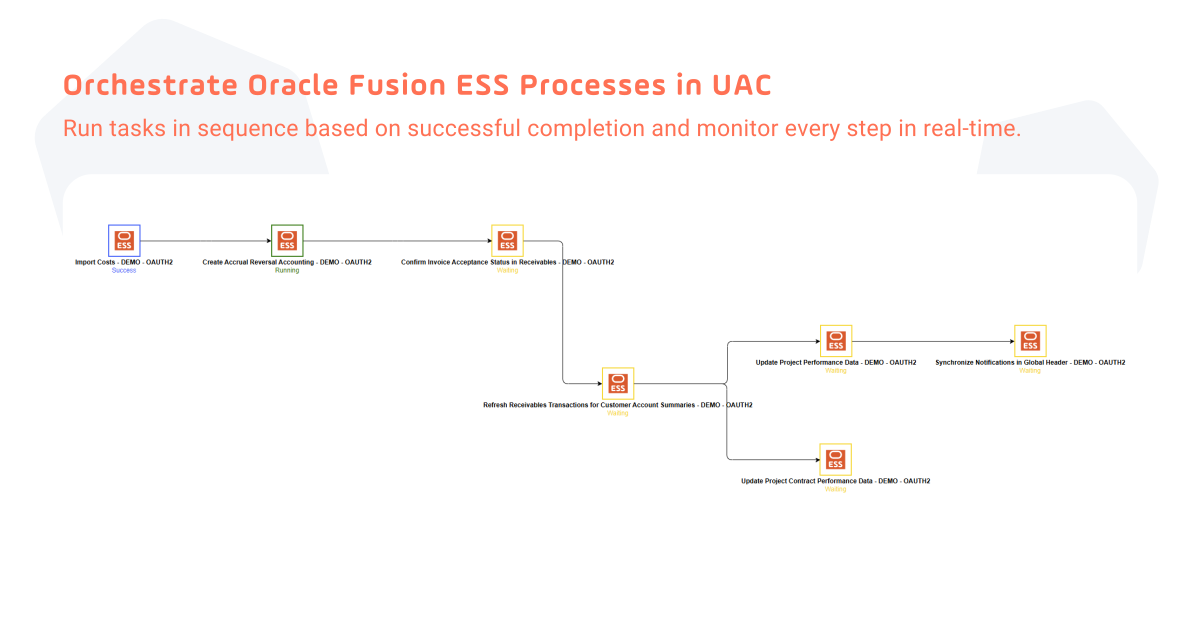
For example, the workflow below chains several Oracle Fusion ESS processes in UAC, including Import Costs, Create Accrual Reversal Accounting, and Confirm Invoice Acceptance Status in Receivables. Downstream tasks only start once their predecessors have finished successfully, and the workflow monitor shows the live status of every step.
Monitoring and Auditability Across the Entire Process
When something breaks at 2am in a workflow that spans Oracle, Snowflake, and ServiceNow, the first question is: where did it break?
With isolated schedulers, answering that question means signing into multiple systems, cross-referencing timestamps, and hoping someone left enough logging in place to trace the failure. That’s time-consuming on a normal day and genuinely painful during a close or compliance review.
Stonebranch keeps the entire workflow visible from a single interface. Job status, execution history, dependencies, and alerts are tracked across every platform in the chain. When a step fails, the context is already there: which step failed, what it was waiting for, what ran before it, and what didn’t run as a result.
The same audit trail matters for IT operations and compliance teams who need to demonstrate that business-critical processes ran correctly, in order, and on time.
See the Oracle Fusion ESS Integration in Action
See how UAC simplifies Oracle Fusion Cloud automation. The video below demonstrates how to configure and run an Oracle Fusion ESS task in UAC using preconfigured processes and the same parameters available in the Oracle Fusion interface.
Follow the Create Accounting example to see the task configuration and how to access the same logs available in Oracle. The overview also covers real-time triggering, workflows that combine Oracle and non-Oracle tasks, and reporting and auditability across the entire process.
Beyond ESS: OIC, Analytics Publisher, HCM Flows, and ODI Are Supported, Too
Stonebranch offers integrations for Oracle Fusion ESS, Oracle Integration Cloud (OIC), Oracle Analytics Publisher, Oracle HCM Flows, and Oracle Data Integrator (ODI). Together, these integrations let organizations coordinate Oracle processes alongside cloud services, data pipelines, file transfers, and other enterprise applications from UAC. A single workflow can connect financial processing, reporting, payroll, and data integration, with scheduling, dependencies, and monitoring managed in one place.
Oracle Integration Cloud (OIC)
Stonebranch supports Oracle Integration Cloud (OIC) with several ways to run and monitor integrations from UAC:
- Scheduled Integrations: Run OIC’s asynchronous scheduled integrations via UAC.
- REST Integrations: Schedule synchronous OIC integrations triggered through REST.
- Oracle API Gateway: Schedule OIC integrations via the Oracle API Gateway.
- Dynamic Selection: Select OIC integrations dynamically, with search options.
- Full Log Visibility: See OIC child logs directly in UAC.
Because the OIC integration runs as a regular task in a UAC workflow, it can be triggered in real time, for example, for an LDAP sync. It can also be combined with Oracle and non-Oracle tasks in the same business process, with auditability and reporting across every step.
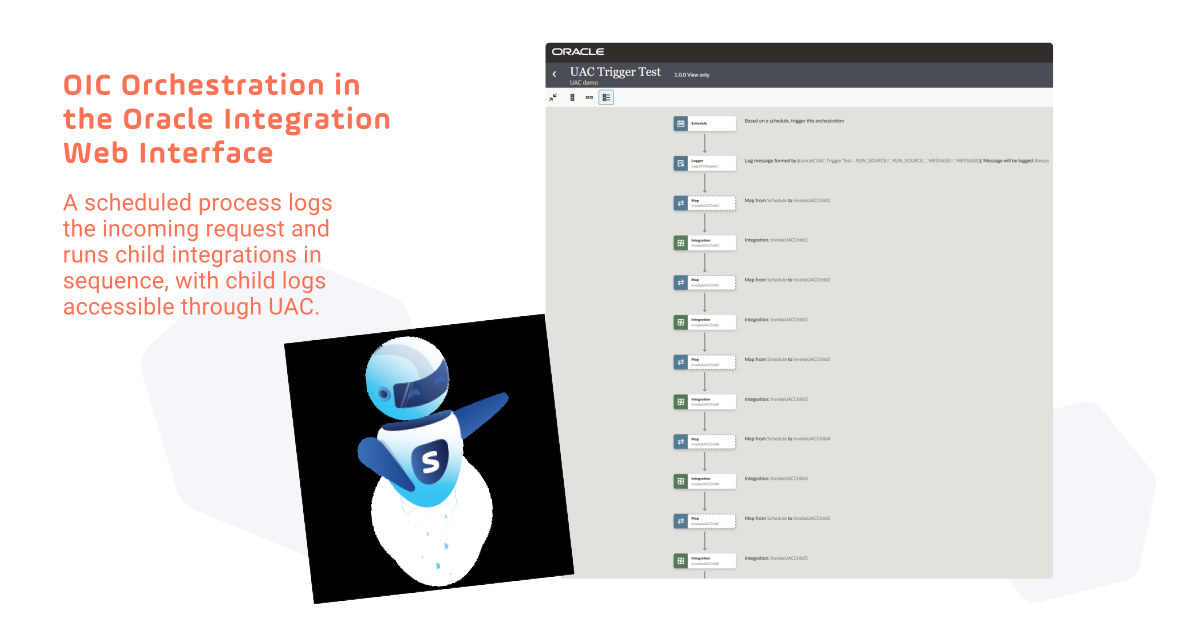
The example below shows an OIC orchestration as it appears in the Oracle Integration web interface. It starts on a schedule, logs the incoming request, and then invokes a series of child integrations one after the other. For orchestrations like this, Stonebranch provides full visibility of the OIC child logs.
Oracle Analytics Publisher
Run and schedule Oracle Analytics Publisher reports directly from UAC workflows so they are generated when a business event occurs, rather than on a fixed schedule.
- Flexible Report Configuration: Set parameters, templates, output formats, locale, and time zone.
- Multi-Channel Delivery: Deliver reports via email, FTP/SFTP, WebDAV, or printer.
- Monitoring and Cancellation: Track report status and cancel running reports.
Reporting becomes part of the broader business process, and report jobs are monitored and managed centrally from UAC.
Oracle HCM Flows
Submit Oracle HCM and payroll flows directly from UAC and make them part of end-to-end enterprise workflows.
- Dynamic Flow Selection: Choose from the available flow patterns.
- Flow Parameters: Support for required and optional flow parameters.
- Execution Monitoring: Monitor flow execution and completion status.
- Workflow Integration: Trigger flows in real time for tasks such as payroll processing and reporting, and orchestrate Oracle and non-Oracle tasks within the same workflow.
Oracle Data Integrator (ODI)
Start ODI data integration processes directly from UAC workflows.
- Scenarios and Load Plans: Execute ODI scenarios and load plans.
- Parameterized Data Loads: Pass variables and select execution contexts for each run.
- Restart Failed Executions: Restart ODI sessions and load plan instances from UAC.
- Execution Results: Capture status, exit codes, execution IDs, and diagnostic output.
ODI processes can be triggered when files arrive or when upstream tasks complete, and can be coordinated with file transfers, applications, and downstream analytics. Manage schedules, dependencies, and results in one place.
Ready to Automate Oracle Fusion ESS?
The Oracle Fusion ESS integration is already running in production at some of the largest Oracle Fusion deployments across the globe. The design reflects that experience: OAuth 2.0 authentication, password and client credential flows, dynamic process selection, and extensible mappings that accommodate custom ESS processes without modifying the integration itself.
For teams still scheduling Oracle Fusion jobs manually or coordinating handoffs between disconnected systems, Stonebranch UAC offers a more connected approach. Oracle processes run as part of broader workflows with full visibility across every step. Learn more about the Oracle Fusion ESS integration in the Stonebranch Integration Hub.
Frequently Asked Questions
What is Oracle Fusion ESS?
Enterprise Scheduler Service (ESS) is the job scheduling engine embedded in Oracle Fusion Cloud. It handles scheduling, running, and monitoring background processes across Oracle’s ERP, HCM, SCM, and other application modules, including generating accounting entries, running payroll, importing transactions, and producing scheduled reports.
What’s the difference between scheduling ESS jobs natively and using a tool like Stonebranch UAC?
Oracle Fusion’s native scheduler manages ESS jobs running in Oracle. It has no visibility into or control over what’s happening in Snowflake, SharePoint, or any other system before or after an Oracle process runs. Stonebranch treats the Oracle Fusion task as one step inside a larger cross-platform workflow, managing dependencies across systems and keeping the entire process visible from a single interface.
Do I need to write REST API code to use the Stonebranch Oracle Fusion ESS integration?
No. The integration provides preconfigured Oracle Fusion processes that use familiar Oracle terminology and parameters. Administrators configure ESS tasks the same way they would inside Oracle Fusion itself, without writing or maintaining custom API calls.
How does Stonebranch handle job dependencies that span Oracle and other systems?
Stonebranch manages cross-system dependencies natively. An Oracle Fusion task can be configured to run only after conditions are met in any upstream system, whether that’s a file arriving, a Snowflake pipeline completing, or a ServiceNow event resolving. If upstream steps fail, downstream Oracle jobs don’t run until the issue is resolved.
Is the Stonebranch Oracle Fusion ESS integration production-ready?
Yes. It’s already running in production at multiple organizations, including one of the largest deployments of Oracle Fusion in Europe.