


Product information "Oracle OIC"
Oracle Integration Cloud (OIC) is Oracle's cloud-based platform for building and managing integrations between enterprise applications, enabling automated data exchange and process flows across cloud and on-premise systems.
This Universal Extension provides the capability to trigger pre-built OIC integrations directly from UAC, allowing Oracle integrations to participate in broader automation pipelines managed by UAC. Scheduled integrations can be triggered on demand rather than waiting for their OIC-defined schedule, and their execution can be tracked until a final state is reached. REST-based integrations can be invoked through their trigger endpoint and return results immediately upon completion. Jobs can also be launched and monitored through an Oracle API Gateway. To support pipeline setup and discovery, the extension can retrieve and display all integrations available on a given OIC instance.
Parameters and payloads can be defined inline or loaded from external files, and execution results are captured and made available for use in subsequent pipeline steps, giving full control over how OIC integrations fit within a larger automation context.
Key Features
- Start OIC Gateway Jobs and Rest and Scheduled Integrations.
- Monitor for Integrations and Jobs with setting monitor interval and number of times for monitor retry.
- Configure payload to be sent when starting jobs and integrations.
- Configure parameters for job execution for OIC Gateway Jobs.
- Configure query parameters when starting REST integrations.
What's New
Fixes
- Fixed: Added missing token refresh mechanism.
| Extension Name: | ue-oracle-oic |
|---|---|
| Universal Template Name: | Oracle OIC |
| Vendor Product: | Oracle OIC |
| Version: | 1.0.2 |
| Compatibility : | UC/UA 7.6 and above |
| Support: | Stonebranch Certified |
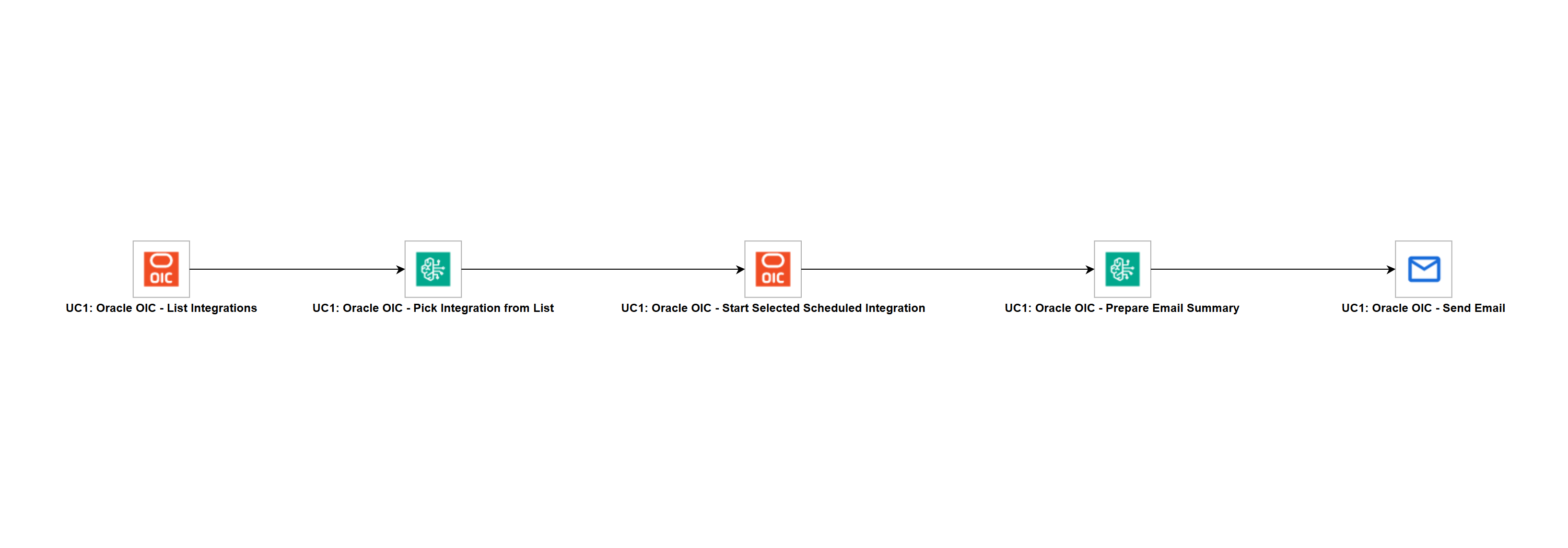
Use Case 1: List Integrations, Start Selected Scheduled Integration and Send Email Summary
Description
This workflow uses Oracle OIC to list and start scheduled integrations programmatically, with AWS Bedrock providing intelligent data extraction and automated email reporting. A list of activated scheduled integrations is retrieved from Oracle OIC, and the first available integration is selected and started. Once execution completes, an AI-generated email summary is sent with the outcome.
The workflow demonstrates how Oracle OIC integrations can be orchestrated end to end through Universal Controller — listing available integrations, starting the selected one, monitoring it to completion, and notifying the team — with AWS Bedrock handling the data extraction and reporting steps. This showcases how UAC automates Oracle OIC operational workflows and reduces manual intervention.
Business Value
- Automate the listing, selection and execution of Oracle OIC scheduled integrations from a single workflow.
- Allow customers to define their own integration filter to target the relevant integrations in their OIC instance.
- Monitor Oracle OIC integration execution automatically and wait for a terminal state before proceeding.
- Automatically send a professional email summary upon integration completion.
- Reduce manual operational overhead by combining Oracle OIC orchestration and reporting into one automated flow.
Technical Capabilities
- Retrieves and filters Oracle OIC integrations by activation status and a customer-defined naming pattern using the OIC Universal Extension.
- Uses AWS Bedrock with JSON Schema enforcement to extract a typed integration ID and version from the OIC integration list.
- Passes structured outputs between tasks using extension output variable references across all workflow steps.
- Starts a scheduled Oracle OIC integration programmatically and monitors execution until a terminal state of
SUCCEEDED,FAILED,ERRORED,ABORTED, orCOMPLETEDis reached. - Transforms raw OIC execution output into a professional plain-text email subject and body using AWS Bedrock.
- Delivers AI-generated email notifications via the Email Universal Extension upon workflow completion.