CRM Trigger for Self-Service Workflow Pattern: Enabling Business-Driven IT Automation
Simplify how business teams provision infrastructure, deliver software securely, and notify customers — all with a single click in the CRM they use every day.
Empower business teams to launch self-service IT workflows directly from their CRM, accelerating provisioning, software delivery, and customer updates while preserving IT governance.
Sales, service, and marketing teams are built for speed. But when a process depends on IT — provisioning infrastructure, onboarding a customer, delivering software — that speed hits a wall. Work devolves into tickets, emails, and manual handoffs that slow everyone down.
The CRM Trigger for Self-Service workflow pattern eliminates that bottleneck. Business users initiate automated, governed processes directly from the CRM they already work in, without ever filing a ticket.
According to the 2026 Stonebranch Global State of IT Automation Report, 35% of enterprises currently automate CRM applications with a workload automation platform — and demand is growing. Respondents identified CRM platforms like Salesforce and HubSpot among the top applications they most want to automate next. The gap between what's possible and what's deployed is closing fast.
Key Takeaways
- CRM-triggered self-service lets business teams initiate IT workflows from Salesforce, HubSpot, and Microsoft Dynamics 365
- Stonebranch Universal Automation Center (UAC) orchestrates actions across CRM, cloud, ERP, ITSM, and collaboration tools
- Business users get faster fulfillment without leaving the CRM
- IT maintains governance through centralized orchestration, visibility, and auditability
- Stonebranch Universal Data Mover Gateway (UDMG) enables secure, automated software and file delivery
- Common use cases: customer onboarding, software delivery, demo environment creation, and service fulfillment
What Is the CRM Trigger for Self-Service Workflow Pattern?
CRM Trigger for Self-Service is a workflow pattern that connects a business action in a CRM to automated IT execution. A request made in Salesforce, HubSpot, or Microsoft Dynamics 365 can launch a workflow that provisions resources, updates enterprise systems, delivers software, and sends notifications — automatically, in sequence, with no manual intervention required.
The goal is to give business teams a self-service experience while keeping execution standardized and controlled by IT. Business users operate from their familiar tools. IT owns the workflow logic, access controls, and audit trail.
Why Automate CRM-Triggered Self-Service?
CRM systems are designed for fast business processes. But most IT-dependent requests still rely on manual coordination. That creates delays, inconsistent execution, and friction between teams that should be working in lockstep.
The data backs this up. The 2025 Gartner Magic Quadrant for Service Orchestration and Automation Platforms notes that a key trend among leading SOAP vendors is the democratization of automation through self-service capabilities aimed at business users and citizen automators. The framing is clear: platforms that keep automation locked inside IT specialist teams are falling behind.
Stonebranch's own 2026 research reinforces this. Among organizations surveyed, 67% now support more than 200 citizen automators with self-service access to their workload automation platform. IT Ops teams lead usage at 75%, but business teams are at 42% and climbing year over year. Automation is no longer an IT-only tool. The question is whether your infrastructure can support that reality safely.
Automating the CRM trigger pattern helps organizations close that gap. Business users initiate approved workflows directly from systems they already use. IT keeps control over workflow logic, access, infrastructure, and delivery. The result: faster response times, less manual effort, and more consistent service delivery.
How the CRM Trigger for Self-Service Workflow Works
This workflow pattern begins with a user action in the CRM and extends across infrastructure, enterprise systems, secure file delivery, and customer communication.
Workflow Overview
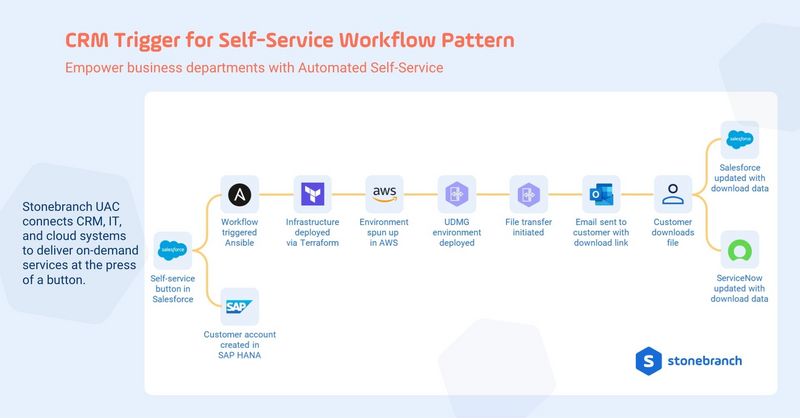
The pattern shows how a single CRM action can trigger an orchestrated workflow that provisions infrastructure, creates or updates enterprise records, delivers software securely, sends customer notifications, and updates delivery status across connected systems.
Watch the Workflow in Action
Typical Workflow Steps
- A business user initiates a request from Salesforce, HubSpot, or Microsoft Dynamics 365
- Stonebranch UAC receives the CRM trigger and launches the workflow
- Infrastructure is provisioned using tools such as Ansible and Terraform across AWS, Azure, or Google Cloud
- Related records are created or updated in enterprise systems such as SAP, Oracle, or Microsoft Dynamics 365
- Universal Data Mover Gateway (UDMG), a B2B MFT solution, securely delivers software or files
- The customer receives an automated notification via Outlook, Microsoft Teams, or Slack
- CRM and ITSM systems are updated with final status
Each step runs automatically, in sequence, with full visibility for IT and a clean, fast experience for the business user who triggered it.
Speed Without Losing Control
The biggest advantage of this pattern is exactly that: speed without loss of control.
Business teams can trigger approved workflows from the CRM instead of waiting on tickets and manual follow-up. Fulfillment time drops. The experience feels seamless for both internal users and the customers they serve.
Meanwhile, IT maintains centralized control over how workflows run, which systems they interact with, and how outcomes are monitored and audited. That matters especially in hybrid IT environments — and hybrid IT is now the norm, not a special case. The 2026 Stonebranch report found that 88% of enterprises operate in hybrid environments, up from 68% in 2024. Running orchestration across on-premises systems, cloud platforms, and SaaS applications isn't an edge case. It's the standard operating model.
This pattern is not limited to software delivery. It applies to any scenario where a business action should trigger a governed IT process: customer onboarding, demo environment creation, subscription activation, service fulfillment. Wherever speed, control, and automation need to work together, this pattern fits.
The 2026 Stonebranch report also found that 58% of IT automation benefits reported by enterprises fall under operational efficiency. But that benchmark is shifting. Organizations are increasingly connecting automation to innovation, customer experience, and speed to market. The CRM trigger pattern is a direct path to those outcomes: a customer-facing process that moves faster because IT execution is no longer the bottleneck.
Business-Driven IT Automation with Stonebranch
The CRM Trigger for Self-Service workflow pattern gives organizations a practical way to connect business demand to IT execution. Using the CRM as the starting point, business teams move faster without bypassing governance.
Stonebranch UAC provides the orchestration layer that coordinates actions across CRM, cloud infrastructure, ERP, ITSM, and communication tools. UDMG supports secure, auditable delivery wherever files or software need to move as part of the workflow.
Gartner recognized Stonebranch as a Leader in the 2025 Magic Quadrant for Service Orchestration and Automation Platforms, citing UAC's intuitive web-based UI, low-code workflow designer, and the ability for non-developers to build complex automations without scripting. That same accessibility is what makes the CRM trigger pattern deployable at scale — across IT and business teams alike.
Together, UAC and UDMG help organizations streamline onboarding, software delivery, and other service-driven processes across hybrid IT environments — with the governance and auditability enterprises require.
Want to Enable Self-Service Automation Directly from Your CRM?
Learn how Stonebranch UAC can help you orchestrate end-to-end workflows starting with a single click.
Schedule your personalized demo today.
FAQ: CRM Trigger for Self-Service
What is the CRM trigger for self-service?
It's a workflow pattern that allows business users to initiate automated IT processes directly from a CRM platform such as Salesforce, HubSpot, or Microsoft Dynamics 365. A single action in the CRM launches an orchestrated workflow that spans infrastructure provisioning, enterprise system updates, secure file delivery, and customer notification.
Why is this workflow pattern valuable for enterprise IT teams?
It removes the manual handoffs — tickets, emails, approvals — that slow down IT-dependent business processes. Business users self-serve from tools they already use, while IT retains full control over workflow logic, access, and auditability. Execution becomes faster and more consistent across teams.
What are LLM workflow design patterns?
LLM workflow design patterns are repeatable ways to embed AI into automation, such as classification and routing, multi-step prompt chains, evaluator-optimizer loops, and LLM-based task planning. These patterns help organizations scale AI adoption safely and effectively.
What processes can the CRM trigger pattern support?
Common use cases include customer onboarding, software delivery, demo environment creation, subscription activation, and service fulfillment. Any scenario where a business action should initiate a governed IT process is a candidate for this pattern.
How does Stonebranch support this workflow pattern?
Stonebranch UAC orchestrates the end-to-end workflow across business and IT systems. UDMG handles secure, auditable file delivery where software or data transfer is part of the process. Together, they support the full workflow from CRM trigger to completion.
Does this work in hybrid IT environments?
Yes. The pattern is designed for hybrid IT. Stonebranch UAC can orchestrate workflows across on-premises systems, cloud platforms, SaaS applications, and enterprise tools. With 88% of enterprises now operating in hybrid environments, this flexibility is a core requirement, not a bonus.
What is the role of UAC and UDMG in this workflow?
Stonebranch Universal Automation Center (UAC) orchestrates the end-to-end workflow across CRM, infrastructure, cloud, and enterprise systems. Universal Data Mover Gateway (UDMG), part of Stonebranch UAC, provides secure, auditable, automated file delivery within the workflow, ensuring compliance and reliability throughout.
Sources: 2026 Stonebranch Global State of IT Automation Report; Gartner Magic Quadrant for Service Orchestration and Automation Platforms, August 2025 (ID G00822654). Gartner does not endorse any vendor, product or service depicted in its research publications and does not advise technology users to select only those vendors with the highest ratings or other designation. Gartner research publications consist of the opinions of Gartner's research organization and should not be construed as statements of fact.
Start Your Automation Initiative Now
Schedule a Live Demo with a Stonebranch Solution Expert