CRM and ERP Orchestration Workflow Pattern: Connecting the Dots Beyond Integration
Avoid silent breaks: upgrade CRM/ERP integration with an orchestration pattern for real-time sync, monitoring, alerting, and scalable end-to-end workflows.
Connecting and orchestrating business processes that run between ERP and CRM systems is a critical part of running a real-time business. However, many enterprises stop short of orchestration and simply integrate data that flows between these systems. This integration-only setup lacks an orchestration layer that transforms siloed automation tasks into automated business processes.
This article explains why it’s important to orchestrate enterprise CRM and ERP platforms together. Additionally, you’ll gain real-world insight into orchestrating automated business processes from a single automation platform, using a practical workflow pattern leveraged by best-in-class organizations.
What is CRM to ERP Orchestration (vs Integration)?
Integration is often confused with orchestration. Let’s take a moment to define each.
CRM to ERP integration typically refers to moving data between your CRM system (like Salesforce or HubSpot) and your ERP platform (such as SAP, Oracle, or D365). These integrations often focus on syncing fields between systems, usually in batch processes or on a schedule.
CRM to ERP orchestration, by contrast, goes beyond basic data movement. It coordinates end-to-end business processes across systems in real time, with built-in control, observability, and error recovery. Orchestration uses workflow automation to link CRM signals with ERP actions — transforming standalone syncs into workflows like:
Quote-to-cash
Order-to-fulfillment
Subscription renewals
Credit approvals
Invoicing and payment
Why Orchestrate CRM and ERP Instead of Just Integrating?
Many enterprises are already using common approaches to integrate CRM with ERP systems. That’s an important first step, as integration allows data to be synced between systems and can include monitoring and automated responses when a sync fails. The gap is usually not the connection itself — it’s the end-to-end process outcome.
Organizations implement CRM and ERP integration using point-to-point connectors, integration platform as a service (iPaaS) tools (e.g., MuleSoft or Boomi), or even scripts that move data on a schedule. But in many cases, these integrations are not real-time.
In many setups, synchronization runs in batches — a snapshot every X minutes or hours — which means you can lose the real-time state that modern processes depend on, and the fast feedback loops back into the CRM.
And when a task is delayed or breaks, the real issue is often silence. Sync errors can go unnoticed until a downstream team discovers missing or incorrect data. Even with a “connection” in place, these gaps still happen — and when they’re detected late, they can trigger rework, delays, and data inconsistencies across teams.
What Integration Approaches are Available to Connect CRM with ERP?
Point-to-Point Connectors
Works well for: Standard and simple data flows, minimal transformation, and a limited number of endpoints.
What tends to be missing at scale: End-to-end visibility across multi-step processes, consistent alerting and escalation, and clear governance when multiple teams touch mappings.
How orchestration complements it: Adds centralized monitoring, alerts, and exception handling across the full CRM–ERP process.
iPaaS
Works well for: Broad connector coverage, mapping and transformation, and common integration patterns.
What tends to be missing at scale: Business workflow control across many steps and systems (not just the integration), standardized exception handling, and centralized operational ownership when multiple data flows interact.
How orchestration complements it: Coordinates the end-to-end business workflow across multiple iPaaS flows and systems with a single operational view.
Scripts
Works well for: Quick and isolated tasks, prototyping, and narrow one-off bridges.
What tends to be missing at scale: Governance, change control, observability, reliable recovery, and shared knowledge beyond a few individuals.
How orchestration complements it: Turns scripts into governed workflow steps with scheduling/event triggers, logging, alerts, and audit trails.
What Happens When You Add a CRM to ERP Orchestration Layer to Your Existing Integration Approach?
Orchestration adds visibility across the whole flow: you can monitor your workloads, trigger alerts, and quickly pinpoint the root cause, so the process is fixed before it impacts orders, revenue, or customer experience. Furthermore, CRM to ERP orchestration enables the next step: bringing CRM signals into those automated ERP workflows and extending automation across the full business process lifecycle.
You gain real-time, event-driven coordination across departments, not just a passive data sync.
Errors are caught and resolved faster to reduce delays and rework.
You can go deeper into system-specific workflows, such as automating close-of-business or financial reconciliation in ERP using real-time CRM status data.
You’re positioned to extend orchestration to other systems, like marketing automation, customer success platforms, or billing engines.
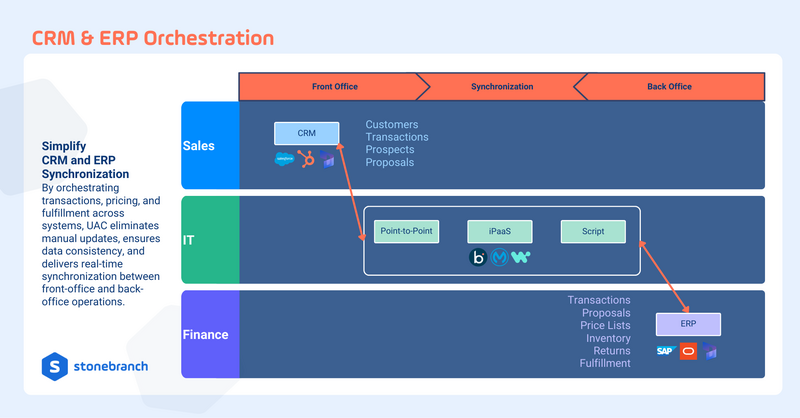
In short, orchestration turns fragmented integrations into a unified business flow between front office and back office — unlocking speed, accuracy, and agility across the customer and operational lifecycle.
Workflow Pattern: CRM and ERP Orchestration in Action
Watch the video below to see how orchestration layers on top of existing CRM to ERP integrations supports real-time control, monitoring, and alerting. The UAC inventory-and-fulfillment workflow pattern (Salesforce to SAP) can be adapted to other CRM and ERP environments (e.g., HubSpot or D365 with Oracle, PeopleSoft, or JD Edwards).
Why this matters: This workflow is foundational to automating broader business processes — your CRM and ERP are connected in a controlled, observable stream. Plus, you can extend the same pattern into processes such as quote-to-cash, renewals, onboarding, finance, and fulfillment workflows (without rebuilding everything from scratch).
Real-time CRM to ERP Orchestration: Connecting the Dots with Stonebranch UAC
Go beyond connection and integration. Stonebranch Universal Automation Center (UAC) provides an orchestration layer that coordinates CRM and ERP data end-to-end for larger business processes — with real-time scheduling and event triggers, monitoring, alerting, and controlled exception handling — so the process remains reliable even if individual steps fail.
By orchestrating workflows across systems, UAC can help you:
Eliminate manual updates between teams and tools.
Ensure data consistency across CRM and ERP.
Deliver real-time synchronization between front-office and back-office operations.
Improve resilience with monitoring, alerting, and exception handling when sync breaks.
Unlock bigger automation by extending beyond a single integration into full business workflows
Ensure governance and reliability through centralized orchestration and audit trails.
Ready to orchestrate CRM and ERP in real time? Request a personalized walkthrough in Stonebranch UAC.
FAQ: CRM & ERP Orchestration
What is CRM–ERP orchestration?
CRM–ERP orchestration coordinates an end-to-end workflow across CRM and ERP systems, so business processes run reliably with monitoring, alerting, and controlled exception handling.
How is orchestration different from CRM–ERP integration?
Integration focuses on connecting systems and transferring data. Orchestration manages the complete business workflow across systems, including sequencing steps, tracking status, handling exceptions, and providing end-to-end visibility.
We already use iPaaS. Why would we add orchestration?
iPaaS is strong for connecting applications and handling mappings and transformations. Orchestration complements iPaaS by coordinating multi-step business processes across multiple systems and flows, adding a single operational view, consistent alerting, and standardized exception handling.
Does orchestration replace our current integrations?
No. Orchestration typically layers on top of existing integrations — point-to-point connectors, iPaaS flows, or scripts — and improves reliability, visibility, and process control without requiring a rip-and-replace approach. Orchestration is additive to traditional integration approaches, allowing your organization to connect to each tool used along the workflow. With this approach, you add significant flexibility to scheduling and orchestration of all the tools used across the workflow, including your iPaaS solutions.
What problems does orchestration solve in CRM to ERP processes?
Orchestration helps teams reduce manual handoffs, improve operational visibility, detect issues earlier, and recover faster when individual steps fail. This ensures order, fulfillment, invoicing, and status updates remain consistent across CRM and ERP.
What’s a good first workflow to orchestrate between CRM and ERP?
Start with a workflow that’s easy to measure and valuable to the business, such as order creation and status updates, inventory/fulfillment updates back to CRM, quote-to-cash handoffs, renewals, or invoice status synchronization.
What does end-to-end monitoring mean in practice?
End-to-end monitoring lets you track a workflow across all steps and systems, receive alerts when something fails, and quickly identify where the failure occurred — without jumping between multiple tools or logs.
How does CRM–ERP orchestration enable broader processes beyond integration?
Once CRM and ERP workflows are orchestrated, the same pattern can be extended to additional systems — billing, customer success platforms, marketing automation, ITSM, and data platforms — creating a scalable foundation for broader business process automation.
Start Your Automation Initiative Now
Schedule a Live Demo with a Stonebranch Solution Expert