AI Workflow Automation Strategies: How to Add GenAI Tasks or Jobs to UAC
Discover how to create intelligent automation workflows that combine AI, LLMs, and traditional orchestration to automate smarter, adapt faster, and respond in real time.
When workflow automation meets artificial intelligence (AI), enterprises gain the power to autonomously optimize operations while adapting, learning, and evolving. With Stonebranch Universal Automation Center (UAC), you can now embed AI-powered tasks directly into your existing workflows to unlock a new level of operational intelligence. From dynamic decision-making to real-time log summarization and classification, embedding AI tasks into automated workflows reshapes how IT teams approach critical automation use cases.
This article explores how to embed AI tasks, or AI jobs, into workflows that span disaster recovery, incident management, infrastructure deployment, and more — enabling predictive, context-aware automation across your hybrid IT landscape.
Key Takeaways
- Stonebranch UAC lets you embed AI tasks directly into real-time automation workflows, combining LLMs and orchestration to make smarter, faster decisions across hybrid IT environments.
- AI embedded workflows transform how incidents, logs, and infrastructure changes are handled, enabling automated summarization, classification, routing, and policy enforcement without manual triage.
- Organizations can safely use both cloud and on-prem AI models, protecting sensitive data with offline PII detection while still leveraging powerful external LLMs for insights and actions.
- All AI-driven actions remain governed, auditable, and human-aware, ensuring compliance, security, and control as intelligent automation scales across the enterprise.
What is AI Workflow Automation?
AI workflow automation blends traditional workflow automation with artificial intelligence tasks, or steps, to deliver smarter, more adaptive processes. Whether leveraging cloud-based large language models (LLMs) like ChatGPT and Google Gemini, or hosted models like Ollama and LLaMA, AI tasks bring contextual awareness and inference capabilities to your automated processes.
In Stonebranch UAC, embedding AI jobs in broader automation workflows can be incorporated just like any other workflow component. These AI steps can:
- Summarize large volumes of unstructured data.
- Classify incidents and apply logic-based routing.
- Identify and redact personally identifiable information (PII).
- Enforce infrastructure compliance.
- Guide automated decisions based on dynamic inputs.
As hybrid IT environments become more complex, embedded AI enables organizations to make smarter decisions, faster — and with more confidence.
Why Embed AI Into Automation Workflows?
Traditionally, automation workflows are made up of a fixed series of steps arranged in a specific order. They’re fast, efficient, and reliable — but not always flexible or context-aware. Embedded AI changes that by allowing workflows to adapt in real-time based on what’s happening inside your systems.
Here are five high-value use cases where embedded AI takes automation to the next level:
- PII Detection and Masking: Support data privacy and compliance by using offline models to automatically detect and redact sensitive data before interacting with cloud-based tools.
- Log Summarization: Parse thousands of lines of log data, reduce noise, and summarize root causes — automatically.
- Incident Classification: Assess severity, categorize incidents, and route tickets to the appropriate team without manual intervention.
- Infrastructure Guardrails: Automatically review infrastructure-as-code (IaC) templates to ensure security policies and resource constraints are enforced before deployments go live.
- Automated Decision-Making: Instead of waiting for human inputs, let AI determine next steps based on criteria like job completion rates, SLA thresholds, or policy fit.
These scenarios are just the beginning. Embedding AI steps into static workflows transforms workload automation (WLA) and service orchestration and automation platforms (SOAPs) into intelligent platforms that are autonomously ready to act, react, and resolve issues with greater speed and precision.
Example Workflow Patterns: Embedding AI in Workflows
Let’s take a deeper dive into each of the five use cases above to see how embedded AI steps can enhance various stages of an existing automated workflow.
Short on time? Watch the video below for a quick, five-minute summary.
AI Enhanced Workflow Automation: Offline Check for Sensitive Data
Use offline AI to ensure sensitive data is detected and masked before any further processing. It’s ideal for privacy-first environments or regulated industries.
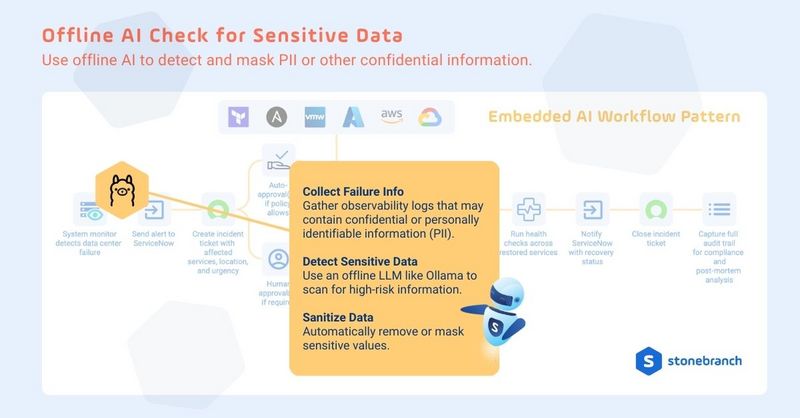
Overview: When a job fails and logs are generated, UAC collects observability data. An offline model like Ollama is used to scan and sanitize these logs, ensuring PII isn’t inadvertently shared with downstream systems.
Workflow Steps:
- Collect failure data from monitoring tools.
- Run an offline LLM for PII detection.
- Mask or redact sensitive information.
- Store sanitized logs for further processing.
Output: Compliant logs are stored in UAC and can be used downstream without exposing private data.
AI Enhanced Workflow Automation: Issue Summarization and Escalation
Let AI transform noisy logs and alerts into concise summaries that can be escalated to ITSM systems, such as ServiceNow.
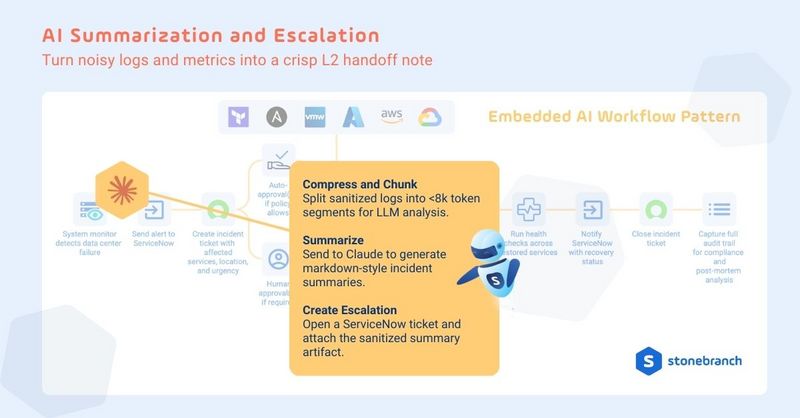
Overview: AI summarizes complex logs and incident metrics, turning raw data into actionable context for the help desk.
Workflow Steps:
- Chunk logs into LLM-readable segments (<8k tokens).
- Use Claude or Gemini to summarize the incident.
- Format output in markdown.
- Attach summary to ServiceNow ticket.
Output: Summary artifact is stored and linked to the incident ticket for full traceability.
AI Enhanced Workflow Automation: Incident Classification and Routing
AI can help reduce triage delays by assigning priority and routing incident tickets to the correct queue.
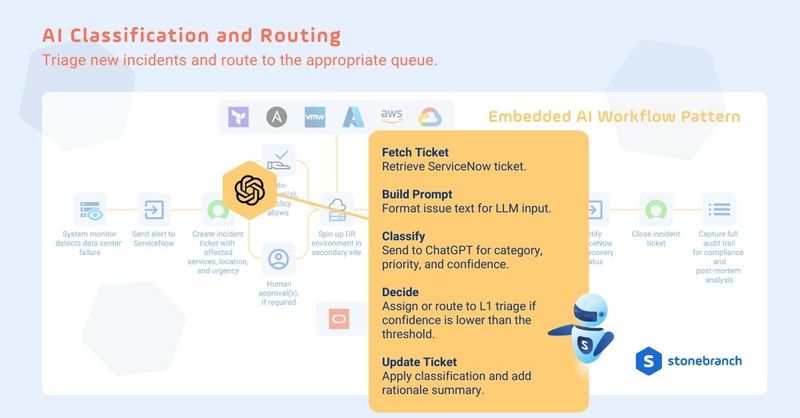
Overview: When a ticket is created, UAC fetches the data and formats a prompt for AI evaluation. Based on category and confidence level, UAC determines whether to assign the ticket or route it to a triage team.
Workflow Steps:
- Fetch the new incident from ServiceNow.
- Send the incident description to OpenAI ChatGPT.
- AI returns priority and confidence score.
- Auto-assign if confidence > threshold.
Else, route to human triage.
Output: Ticket is updated with AI-provided classification and rationale, then routed appropriately.
AI Enhanced Workflow Automation: Infrastructure Deployment Guardrails
Let AI be the one to enforce policy compliance for Terraform or Ansible deployments submitted via self-service.
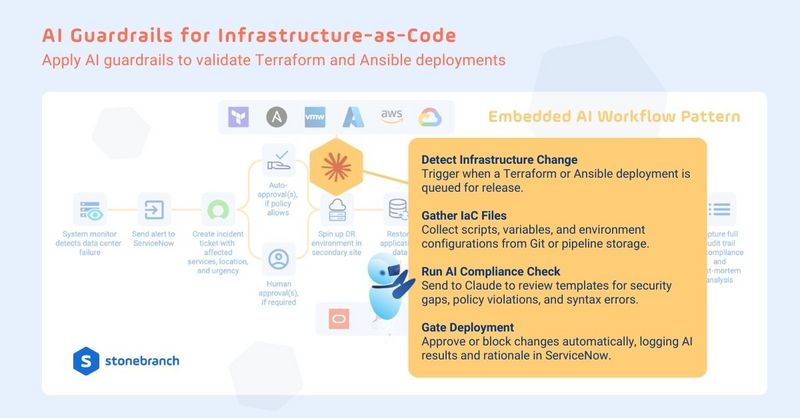
Overview: UAC validates infrastructure code before provisioning. AI checks for open ports, excessive resource allocations, or non-compliant configs.
Workflow Steps:
- Detect queued infrastructure deployment.
- Fetch related scripts, variables, and context.
- Use Claude to assess risk and compliance.
- Approve or block deployment.
- Log decisions in ServiceNow.
Output: Only compliant deployments proceed, while UAC logs decisions for audit and compliance.
AI Enhanced Workflow Automation: AI-Based Decision Support
Automate complex operational decisions by using AI to evaluate real-time context, historical data, and validated artifacts before determining the next best action. Instead of relying on rigid if/then logic or manual judgment calls, AI-based decision support allows workflows to adapt dynamically while balancing speed, accuracy, and risk during critical moments.
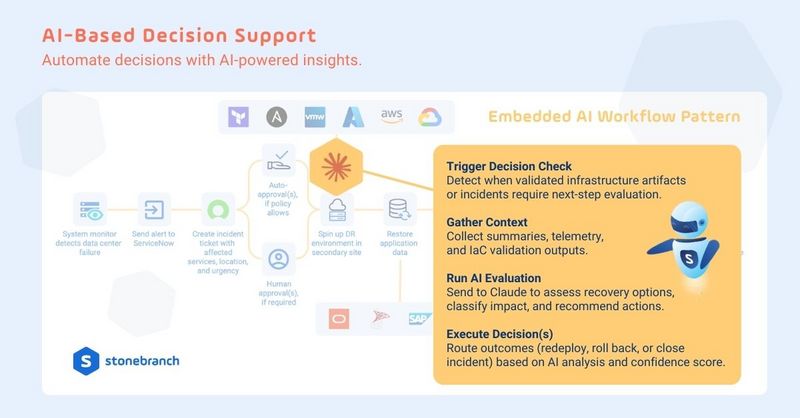
Overview: When a workflow reaches a critical decision point — such as whether to proceed with recovery, redeploy infrastructure, roll back a change, or close an incident — UAC gathers operational context and hands it to an AI model for evaluation. The AI analyzes telemetry, validation results, and historical signals to assess impact, recommend actions, and determine confidence. UAC can then automatically execute the next step or route the decision for human review based on predefined thresholds.
Workflow Steps:
- Detect when a workflow reaches a critical decision point.
- Collect telemetries, summaries, and validation outputs.
- Prompt Claude to assess and recommend next steps.
- Trigger the appropriate process(es).
Output: UAC executes the recommended action or escalates for approval, while storing the full AI decision context, rationale, and outcome to ensure transparency, traceability, and compliance.
A World of Possibilities in AI-Embedded Workflows
These AI-powered workflows leverage the object-oriented nature of Stonebranch UAC, making them inherently modular, reusable, and customizable. You choose the models, platforms, and rules that make sense for your environment — whether using OpenAI, Google, Claude, or your own enterprise-trained LLMs.
The examples above only hint at the world of possibilities that await. Learn about additional AI-powered features and processes from Robi AI within UAC?
Ready to build your own AI-powered workflows in UAC? Request a personalized walkthrough to learn more.
FAQ: Embedded AI Workflows:
What AI models are supported in Stonebranch workflows?
You can embed AI jobs that call external tools like ChatGPT or Google Gemini, or use on-prem models like LLaMA via REST APIs or local agents.
How is data privacy maintained when using AI?
Use offline AI models to scan and mask sensitive data before sending it to cloud-based models, ensuring PII and compliance concerns are addressed.
Can I customize where AI fits into my automation workflows?
Yes, each AI step is modular. You can use AI to detect failures, classify incidents, generate summaries, or make decisions based on context.
Does embedding AI tasks in AI workflow automation replace IT staff?
No. These workflows augment human teams, allowing them to focus on higher-value tasks while automation handles the heavy lifting.
What are the business benefits of AI workflows?
They reduce mean time to resolution (MTTR), enforce compliance, lower manual workloads, and optimize resource usage in cloud deployments.
Start Your Automation Initiative Now
Schedule a Live Demo with a Stonebranch Solution Expert