UAC 8.1: What’s New in AI-Powered Automation, Security, and Integrations
The latest Stonebranch UAC release, 8.1, takes Robi AI a step further with the AI Workflow Builder and AI Task Builder. These new capabilities enable users to create and extend workflows and build tasks through natural-language conversations, while maintaining control through human review and approval.
UAC 8.1 also delivers enhanced data encryption and session management, more flexible jobs-as-code capabilities, expanded APIs, and improvements to task execution, monitoring, and workflow management. The release incorporates approximately 30 customer-requested enhancements that address real-world operational requirements.
Alongside these improvements, new and enhanced integrations extend automation capabilities across enterprise applications, cloud platforms, data pipelines, and AI services.
Key Takeaways
- AI-Powered Workflow and Task Creation: Robi AI 2.0 introduces AI Workflow Builder and AI Task Builder, enabling users to create and extend workflows and build tasks through natural-language conversations, with human review and approval.
- Stronger Security and Compliance: Enhanced data encryption and new session management controls help protect sensitive information and support enterprise security requirements.
- Improved Jobs-as-Code Capabilities: Event-driven change tracking and more flexible imports simplify configuration management for automation across environments.
- Enhanced Automation and Operational Control: Improvements to task execution, APIs, monitoring, and workflow management provide greater flexibility, visibility, and control across hybrid IT environments.
- Expanded Integrations and Connectivity: New and enhanced integrations extend orchestration across SAP, Oracle Fusion Cloud, data pipelines, observability platforms, and AI services.
Key Enhancements in UAC 8.1
Robi AI 2.0: Build and Extend Workflows with Natural Language
With UAC 8.1, Stonebranch introduces Robi AI 2.0, expanding its AI-powered automation capabilities with two new features: AI Workflow Builder and AI Task Builder. These capabilities simplify automation development by allowing users to create workflows and tasks through natural-language conversations directly within UAC.
AI Workflow Builder enables users to create new workflows or extend existing ones through an interactive conversation with Robi AI. Users can describe their requirements in detail or let Robi guide them step by step through the process. Robi identifies existing tasks, helps define execution sequences and dependencies, and generates a workflow plan for review. Users can also select tasks using advanced filtering and pattern matching, making it easier to assemble workflows containing large numbers of tasks.
AI Task Builder takes the same conversational approach to task creation. Users can describe the task they need, including execution details such as the target agent, credentials, scripts, and success criteria. Robi then assembles the task definition using task-type-specific AI agents. Supported task types include Windows, Linux/Unix, IBM i, SAP, timer, and manual tasks.
Both builders follow a human-in-the-loop approach. Robi presents proposed configurations and changes for review, and nothing is written to the Universal Controller until the user approves. This keeps users in control while reducing the manual effort required to build and maintain automation workflows.
Additional Robi AI 2.0 enhancements include interactive status updates that indicate when Robi is processing requests or executing tools, as well as updated AI model support.
Together, these capabilities help experienced automation teams build complex workflows faster while making automation development more accessible to users with less technical expertise.
See the Robi AI Workflow Builder and AI Task Builder in Action
Stronger Security and Session Management
UAC 8.1 introduces enhanced security capabilities to help organizations protect sensitive automation data and meet enterprise security and compliance requirements.
The Universal Controller now supports a centralized, two-tier envelope encryption model using Key Encryption Keys (KEKs) and 256-bit AES Data Encryption Keys (DEKs). This strengthens the protection of sensitive information stored in the UAC database, including credentials, OAuth configurations, and SAML settings.
In addition, new user session management controls provide greater flexibility in enforcing security policies:
- Idle Session Timeout: Automatically expires sessions after a configured period without actual user interaction, regardless of background activity such as dashboard refreshes.
- Maximum Session Lifetime: Sets a fixed limit on session duration, requiring users to sign in again once the configured period has elapsed, even if they remain active.
These customer-requested enhancements give administrators more granular control over user sessions while helping organizations strengthen security and support compliance requirements.
Jobs-as-Code: More Flexible and Event-Driven Automation Management
Simplify automation configuration management and improve consistency across environments with the new jobs-as-code enhancements in UAC 8.1.
With event-driven change tracking, the Universal Controller can now publish Universal Events whenever supported objects (such as tasks, triggers, agents, webhooks, credentials, and calendars) are created, updated, or deleted. Administrators can enable event publishing via configurable system properties, laying the foundation for automated configuration tracking and integration with version control workflows.
UAC 8.1 also improves object imports across environments. Workflow API responses now include both task names and system IDs (sysIds). During import, UAC can identify referenced tasks by their sysId or fall back to name-based matching when the sysId is missing or differs between environments. This makes it easier to move automation definitions between development, testing, and production environments.
See the New Jobs-as-Code Enhancements in Action
Enhanced Task Execution Across Enterprise Systems
UAC 8.1 introduces several enhancements to task execution, providing greater flexibility and control when managing workloads across Windows, Linux, IBM i, and z/OS environments.
Windows and Linux tasks now include capabilities previously available only through a specialized extension. Key improvements include:
- Profile File Support: Execute a specified profile script on the agent before the main task command to initialize the environment.
- STDOUT/STDERR Redirection: Redirect standard output and error streams to files on the agent for easier access to execution results and logs.
- Script Variable Support: Reference scripts dynamically through variables resolved at runtime, now supported for Windows, Linux, and IBM i tasks.
- Task Variables: Automatically append task context information, such as task names and IDs, to operating system environment variables.
For z/OS workloads, a new Use JCL Save Library option allows tasks to reuse previously saved JCL during restarts, providing greater control over job execution.
UAC 8.1 also delivers Universal Data Mover (UDM) performance improvements, allowing more files to be processed concurrently to meet growing data transfer demands.
Expanded APIs, Monitoring, and Workflow Usability
Additional improvements to UAC’s web service API, monitoring capabilities, and user experience help teams manage automation more efficiently and gain greater visibility into workflow execution.
Web service API enhancements provide more flexibility when interacting with UAC:
- New PATCH Endpoints: Update individual fields in task definitions, SAP task instances, and user or group records without replacing the entire object.
- Expanded Metrics API Access: Use the new ops_metrics role to enable access to Universal Controller metrics without requiring broader administrative permissions.
- Workflow Task Instance Data: Retrieve complete workflow task instance structures in JSON or XML format, including task references, statuses, and positions.
Monitoring and workflow usability improvements make it easier to manage complex automation processes:
- Business Service Filtering: Filter task monitors by business service membership for more targeted monitoring.
- Improved Retry Visibility: View remaining retries and upcoming retry times directly in the Workflow Monitor.
- Conditional Dependency Indicators: Identify conditional expressions more easily in the Workflow Editor and Monitor.
- Flexible Scheduling and Forecasting: Select multiple time values in composite triggers and override variables when forecasting workflows to preview different execution scenarios.
- Agent Cluster Priority Routing: A new LIST distribution option routes tasks to agents according to a user-defined priority order.
Additional Platform and Integration Updates
Expanded ERP Automation Across SAP and Oracle
Stonebranch continues to expand its integration ecosystem, enabling organizations to orchestrate business-critical processes across SAP, Oracle Fusion Cloud, and hybrid IT environments.
Oracle Fusion Cloud Automation
New and enhanced Oracle integrations extend automation across ERP processes, HCM workflows, data integration, and reporting.
Key highlights include:
- Oracle Fusion Cloud ESS: Automate business processes with more than 120 preconfigured ESS processes across Oracle Fusion applications, including accounting, cost imports, and other financial operations. Select processes dynamically and configure parameters directly within UAC.
- Oracle HCM Flows: Submit and monitor HCM and payroll flows directly from UAC, with dynamic flow pattern selection and support for required and optional parameters. Integrate payroll processing and reporting into end-to-end workflows.
- Oracle Integration Cloud (OIC): Schedule and monitor scheduled and REST-based integrations, with dynamic integration selection and visibility into execution details and child logs.
- Oracle Analytics Publisher: Trigger and schedule reports from UAC workflows, configure parameters, templates, and output formats, and deliver results via email, FTP/SFTP, WebDAV, or printer.
- Oracle Data Integrator (ODI): Execute scenarios and load Plans, parameterize data loads, and restart failed executions directly from UAC. Monitor execution results and coordinate ODI with upstream and downstream processes.
See Oracle Fusion Cloud ESS Automation in Action
SAP Automation Across Cloud and Hybrid Environments
Stonebranch has also expanded its SAP integration capabilities, with a particular focus on SAP cloud environments, including SAP S/4HANA Cloud and SAP Business Data Cloud (BDC).
Key enhancements include:
- SAP Application Jobs: Schedule and monitor application jobs across SAP environments, including SAP S/4HANA Cloud and SAP Integrated Business Planning (IBP), using a unified task integration.
- SAP Business Data Cloud: Integrate SAP HANA Cloud Data Lake operations into automation workflows, including file transfers and interactions with the Data Lake Relational Engine.
- SAP Build Process Automation (BPA): Start and monitor SAP BPA flows as part of end-to-end workflows.
- ServiceNow-SAP Integration: Use the certified Stonebranch ServiceNow application to schedule SAP jobs and other automation processes directly from ServiceNow.
Expanded Integrations for Data, AI, and Observability
New and enhanced integrations extend UAC’s orchestration capabilities across cloud data platforms and observability tools, helping organizations connect data pipelines with broader business processes and monitor automation performance.
Data Pipeline Orchestration
- Microsoft Fabric: Orchestrate Microsoft Fabric pipelines, including Data Factory and Synapse workloads, directly from UAC. Support for managed identities enables passwordless authentication.
- n8n Workflows: Trigger n8n workflows as part of larger automation processes, combining application jobs, data pipelines, and other tasks within a single UAC workflow.
- Airbyte ETL: Trigger database synchronization processes to integrate data movement and transformation into enterprise automation workflows.
New Dashboards for Enhanced Observability
Preconfigured dashboards for Dynatrace, Datadog, and Grafana provide centralized visibility into Universal Controller operations and automation performance. These integrations enable teams to monitor system health, task execution, database and OMS connections, and AI services.
The Dynatrace integration, for example, supports monitoring multiple Universal Controllers from a single dashboard, with access to logs and AI-related metrics such as token usage and MCP server connections. This helps operations teams identify issues and analyze automation activity using their existing observability platforms.
Integrating AI into Enterprise Workflows: AI LLM and Kong AI Gateway
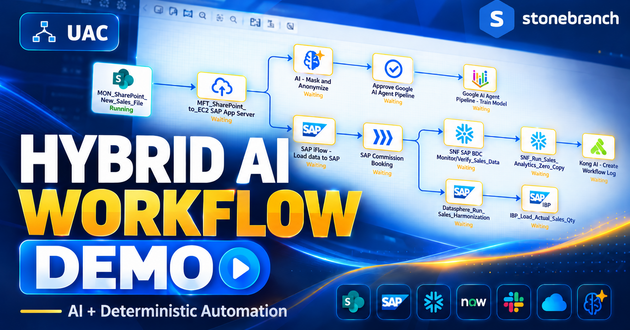
New AI integrations expand how organizations incorporate AI services and agentic actions into enterprise automation workflows. With AI LLM and Kong AI Gateway integrations, UAC can execute AI-powered tasks as part of larger processes, connecting AI capabilities with traditional automation.
The Kong AI Gateway integration also supports interactions with large language models and MCP-enabled tools, allowing AI-driven actions to be orchestrated alongside existing applications and workloads. Additional integrations, including Google AI Agent Pipelines, extend UAC’s connectivity to external AI platforms.
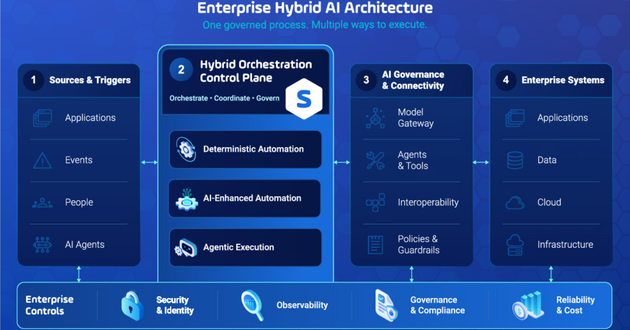
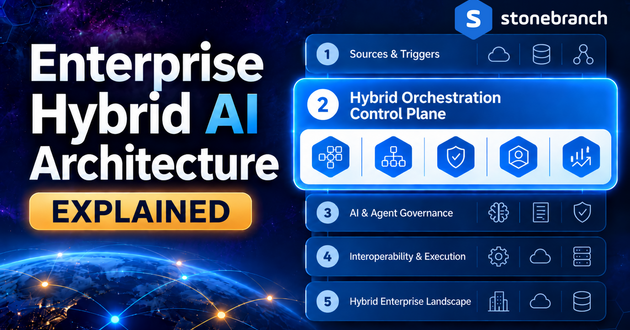
These capabilities support Stonebranch‘s Hybrid Orchestration Control Plane, which brings traditional automation, AI tasks, and agentic processes into governed end-to-end workflows with centralized visibility and control.
Universal Data Mover Gateway V 3.4: Enhanced Managed File Transfer
Stonebranch Universal Data Mover Gateway (UDMG) 3.4 brings new capabilities to B2B managed file transfer, strengthening administration, security, and deployment flexibility. Integrated with UAC, UDMG enables organizations to securely exchange files with external trading partners as part of broader automation workflows.
Key enhancements include:
- Configuration Versioning and Diffs: Track changes to configuration objects, compare versions, and identify what changed and when to simplify troubleshooting and compliance reviews.
- Server Health Monitoring: Gain at-a-glance visibility into critical components, including endpoints, certificates, database connections, and other services, to identify potential issues faster.
- Container Support: Deploy UDMG in containerized environments, including Kubernetes, with greater flexibility for modern infrastructure.
- Forced Password Reset: Require password resets for UDMG users and external trading partners accessing the Web Transfer Client, strengthening access security.
Get Started with UAC 8.1
Ready to explore what’s new in Stonebranch Universal Automation Center 8.1? Dive deeper into the latest capabilities and discover how UAC can help you simplify and scale automation across your hybrid IT environment.
- Explore the Product Release Notes: Robi AI 2.0.0, Universal Controller 8.1.0.0, Universal Agent 8.1.0.0 and UDMG 3.4.0 for a complete overview of new features, enhancements, and technical details.
- Watch the UserVerse Online 2026 Session On Demand to see the latest capabilities in action, including product demonstrations and expert insights.