
SAP Automation Use CasE
SAP Utilities Mass Activity Automation
Automate, monitor, and orchestrate mass activities across SAP IS-U and SAP S/4HANA Utilities to ensure reliable billing, invoicing, and customer communications.
Automate Mass Activities Across SAP IS-U and SAP S/4HANA Utilities
Reduce Operational Risk and Deliver Accurate, On-Time Billing for Utilities and Waste Management
Reliable, on-time customer billing is essential for utilities, energy, and waste management providers operating at scale.
Stonebranch SAP Automation orchestrates the entire SAP Utilities mass activity process with a centralized workload automation solution for SAP environments, helping teams reduce costly errors, meet regulatory requirements and customer service commitments, and keep billing, invoicing, and customer communications on schedule.
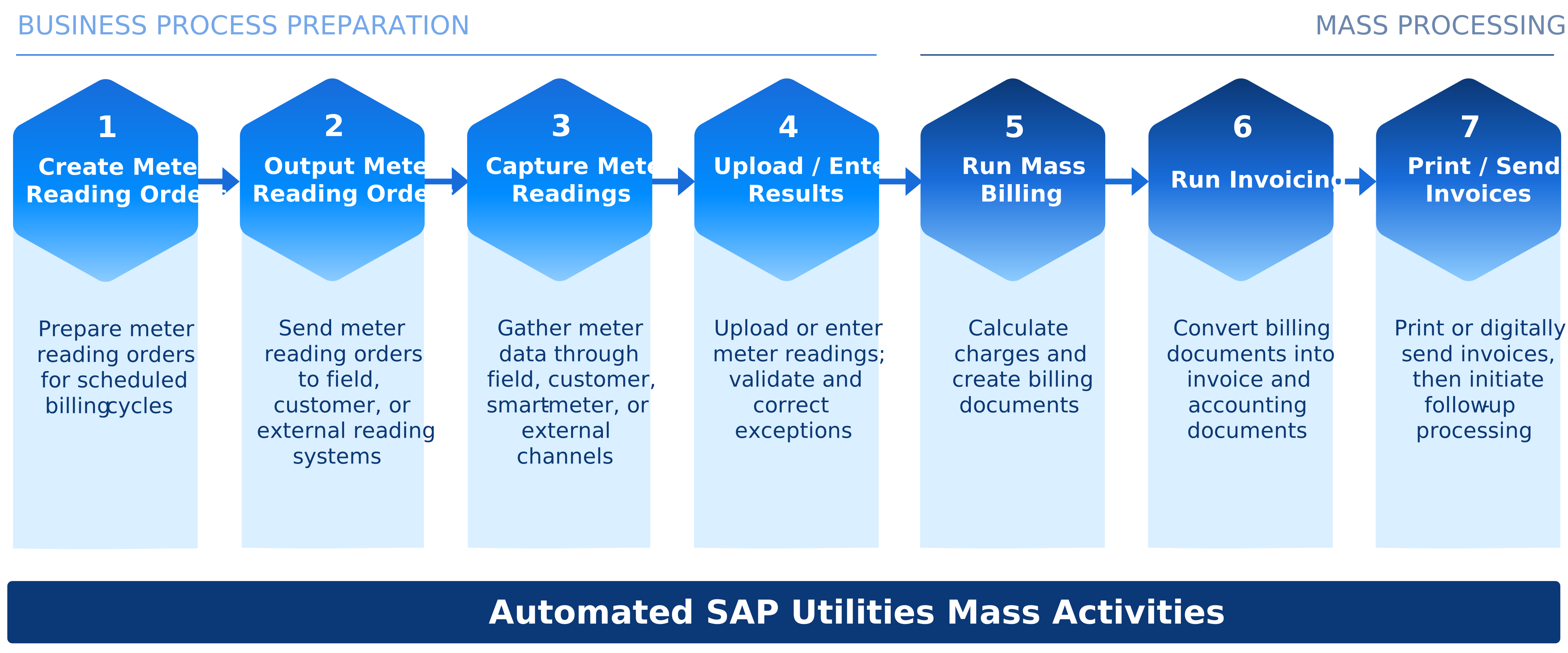
What is an SAP Utilities Mass Activity?
SAP Utilities uses mass activities to process high-volume operations such as billing, invoicing, and print runs. Each mass activity is automatically split into parallel background jobs, allowing millions of customer records to be processed efficiently.
Once complete, automation can trigger downstream processes such as invoicing, dunning, and customer communications to keep operations running on schedule.
Automate SAP Utilities Mass Activities from Trigger to Execution
Process Inputs
- Meter Reading OrdersGenerated for billing cycles
- Meter Reading OutputSent to field, customers, or external systems
- Meter ReadingsCollected via field, customer, smart meters, or external channels
- Readings Uploaded / EnteredValidated, exceptions handled and corrected
SAP Utilities Mass Activities
Orchestrate and execute SAP Utilities activities with precision, visibility, and control.
Process Outputs
- Billing DocumentsCharges calculated and billing documents created
- InvoicesBilling documents converted to invoice and accounting docs
- Print / Send InvoicesInvoices printed or sent via email, portal, or EDI
- Status & NotificationsJob completion and exception notifications to teams and service systems
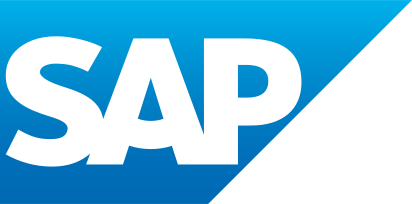 SAP UtilitiesMass Activities
The Solution Isn’t Just Another Batch Job.
It’s Enterprise Process Orchestration in Real Time.
SAP IS-U and SAP S/4HANA Utilities users can keep customer billing accurate and on schedule, reduce the cost of billing delays and errors, and meet regulatory requirements and customer service commitments, even at high transaction volumes.
Why SAP, Billing, and IT Operations Teams Choose Stonebranch:
Stonebranch helps utilities and waste management providers move beyond manual, job-by-job execution of SAP Utilities mass activities to fully orchestrated, cross-system automation.
- Reduce manual operations and administrative effort.
- Accelerate the meter-to-cash process.
- Ensure mass activities run on time.
- Avoid missed billing cycles.
- Improve visibility into child job failures.
- Coordinate SAP Utilities processing with SAP and non-SAP systems.
- Support complex, high-volume billing environments.
- Create a complete audit trail of every mass activity execution.
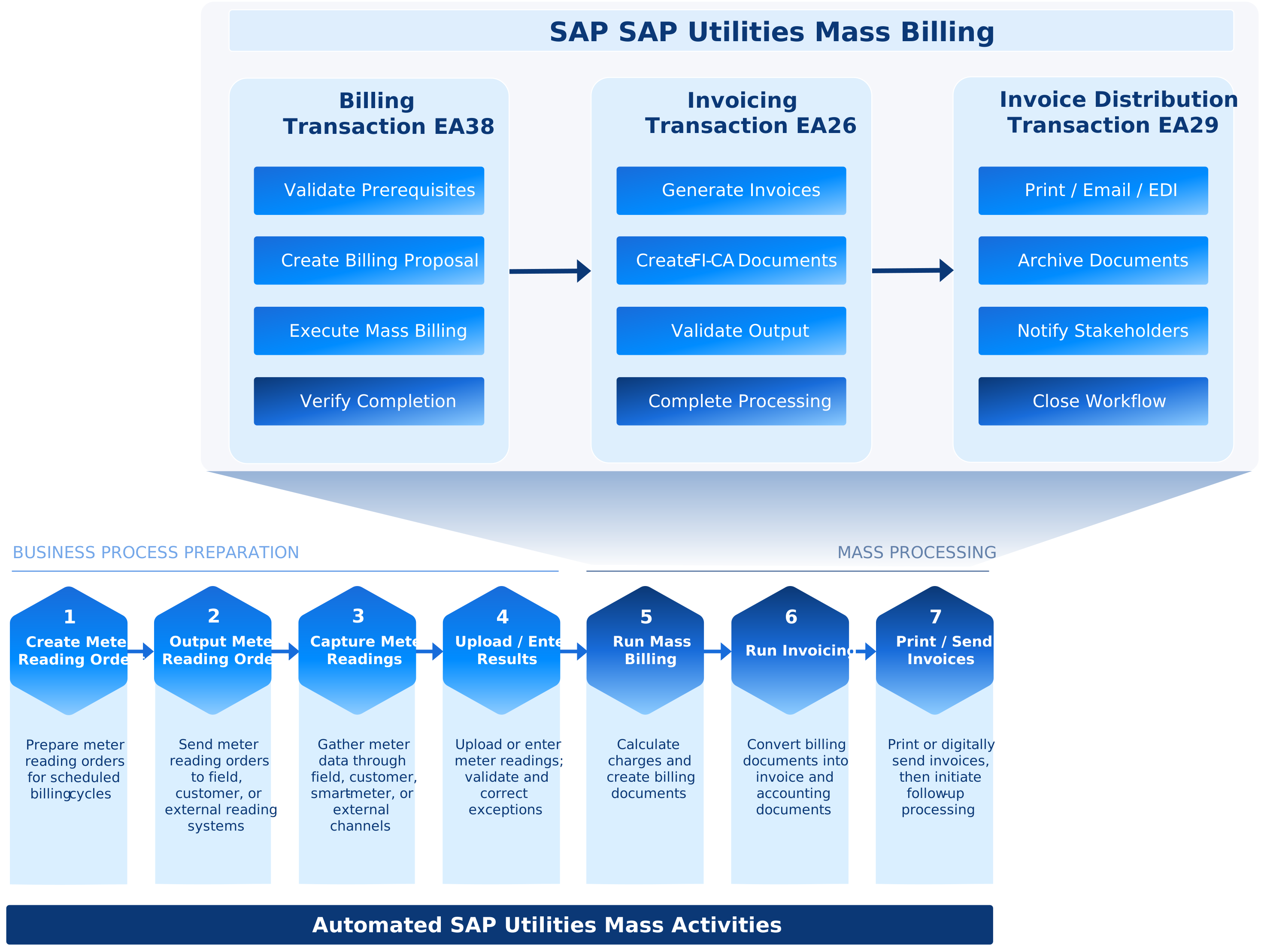
Stonebranch Orchestrates the SAP Utilities Mass Activities Process
Mass Activity Inputs
Connect Processing
Inputs
Coordinate the data, systems, and dependencies required before mass activity processing begins:
- Meter reading and consumption data
- Customer master data updates
- File transfers and interface dependencies
- CRM, print, and archiving dependencies
Execution
Automate SAP Mass Activity Execution
Schedule and execute SAP Utilities mass activities consistently across systems, divisions, and regions:
- SAP mass activity jobs and parallel child jobs
- Time- or event-based triggers
- Human approval steps
Process Control
Monitor and
Recover
Track every step of the mass activity process and respond quickly when issues arise:
- Exception handling and automated recovery for child jobs
- Alerts and notifications
- SLA monitoring
- Audit trails
Continuity
Continue Downstream
Workflows
Automatically trigger and monitor downstream processes, such as:
- Invoicing and dunning
- Print and correspondence output
- FI-CA postings and accounting updates
- CRM and reporting updates
Explore Stonebranch Solutions for SAP Automation
BatchMan
An SAP-native workload automation solution that is form-fit for SAP end-users.
- Access Batchman as an add-on to your SAP instance. Looks and feels just like your SAP instance.
- Automate and orchestrate SAP’s full suite of applications.
- Best for SAP-centric automation.
Universal Automation Center:
A service orchestration and automation platform to automate SAP and beyond.
- Centralized automation for the entire enterprise.
- Automate any SAP application alongside the rest of your Hybrid IT environment.
- Best for SAP and non-SAP automation.
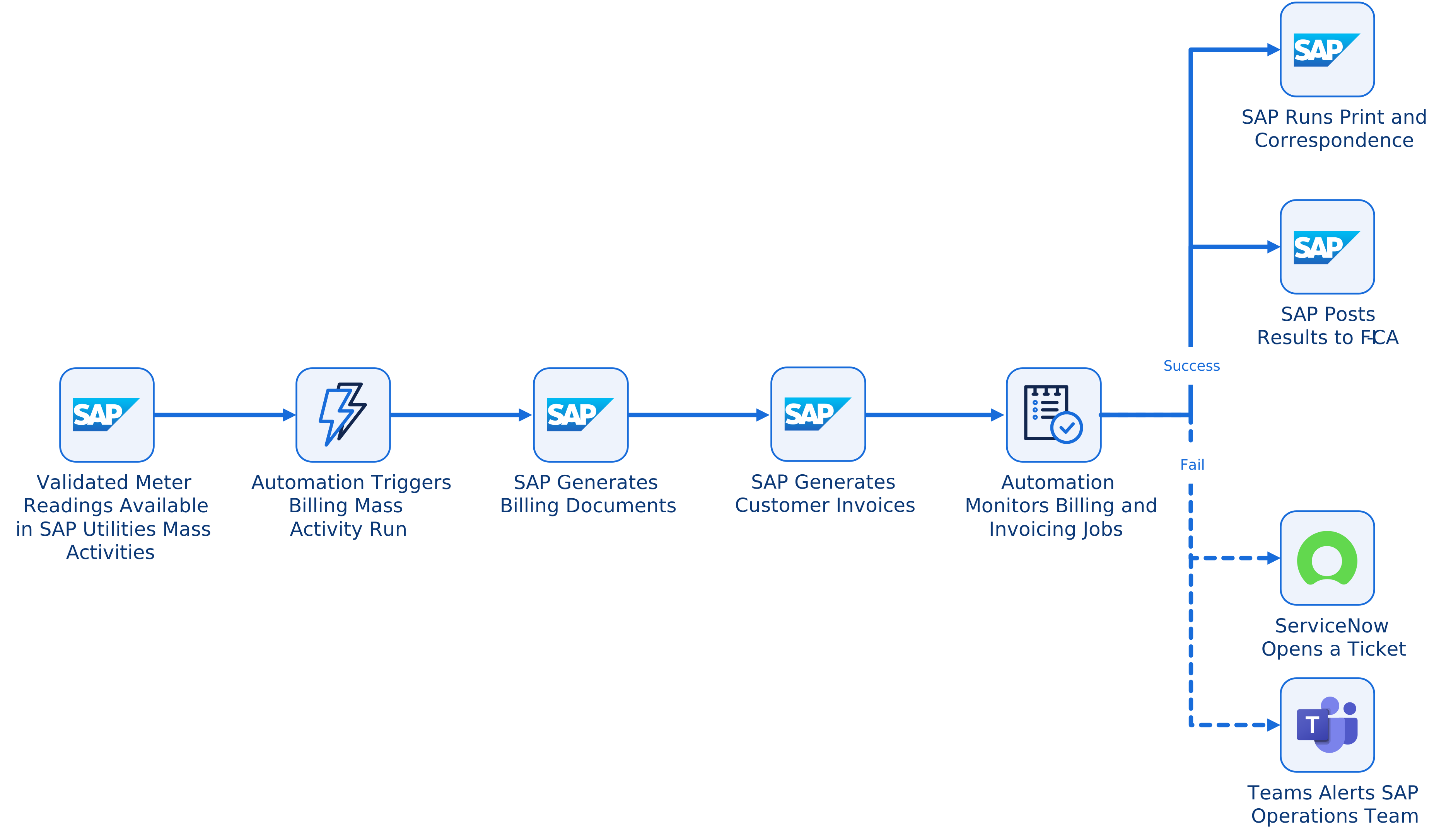
SAP Utilities Meter to Cash Automation Workflow Example
SAP meter-to-cash automates the complete utility revenue cycle — from recording customer usage to billing, payment, and financial reconciliation.
A utility provider might automate the following workflow:
- Meter reading data is uploaded to SAP Utilities.
- Automation triggers a billing mass activity for selected divisions.
- SAP generates billing documents and invoices as parallel child jobs.
- The automation platform monitors the mass activity and child jobs.
- If successful, it triggers print and correspondence processing and posts the results to FI-CA.
- If errors occur, it opens a ServiceNow ticket and alerts the SAP operations team in Teams.
Frequently Asked Questions (FAQ)
Why automate SAP Utilities mass activities?
SAP Utilities mass activities often process high transaction volumes across billing, invoicing, print runs, dunning, and follow-up workflows. Automation helps reduce manual effort, avoid missed billing cycles, improve visibility into errors, and keep customer billing processes running on schedule.
What are SAP Utilities mass activities?
SAP Utilities, including SAP IS-U and SAP S/4HANA Utilities, supports electricity, gas, water, and waste management providers by managing customer data, billing, device management, accounting, and other core business processes.
SAP Utilities mass activities are large-scale background processes that execute high-volume operations, such as billing, invoicing, dunning, and customer correspondence. These activities are split into parallel child jobs to efficiently process large workloads and trigger downstream processes on schedule.
Why is monitoring child jobs important in SAP Utilities?
SAP Utilities mass activities often run as parent jobs with multiple parallel child jobs. If a child job fails, the overall process can be delayed or incomplete. Centralized monitoring helps teams detect failures faster, identify where issues occurred, and trigger recovery actions before billing timelines are affected.
How does Stonebranch help reduce errors in SAP Utilities mass activity processing?
Stonebranch helps reduce errors by orchestrating SAP Utilities jobs, dependencies, approvals, alerts, and recovery steps in a controlled workflow. Teams gain better visibility into process status, child job failures, exceptions, and follow-up activities.
Can SAP Utilities mass activity automation support billing and invoicing?
Yes. Stonebranch automates and monitors SAP Utilities billing and invoicing processes, including mass activity execution, child job monitoring, print and correspondence processing, FI-CA-related updates, and downstream workflows such as invoicing, dunning, and customer communications.
Can Stonebranch coordinate SAP Utilities with non-SAP systems?
Yes. Stonebranch can coordinate SAP Utilities processing with non-SAP systems such as CRM, print, archiving, reporting, file transfer, service management, and communication platforms. This helps connect SAP mass activity processing with the broader enterprise workflow.
Is SAP Utilities automation only about SAP job scheduling?
No. SAP job scheduling is only one part of the process. A complete SAP Utilities automation workflow can include data dependencies, mass activity execution, child job monitoring, exception handling, alerts, recovery, audit trails, downstream processing, and reporting.