
SAP Automation Use CasE
SAP Payment Run Automation
Keep SAP FI payment runs reliable, controlled, and auditable with automated scheduling, monitoring, recovery, and end-to-end orchestration.
Automate Payment Runs in SAP
Reduce Manual Effort and Improve Control for Business-Critical SAP Payment Processes
SAP payment runs are business-critical processes used to execute payments in SAP.
These processes are time- and budget-sensitive and compliance-relevant. Yet in standard SAP environments, they often involve many manual steps — from parameter maintenance to follow-up activities.
Stonebranch SAP Automation helps orchestrate SAP payment run processes from a centralized workload automation platform. Teams can reduce manual work, improve process visibility, monitor execution, and help prevent errors before they disrupt downstream financial operations.
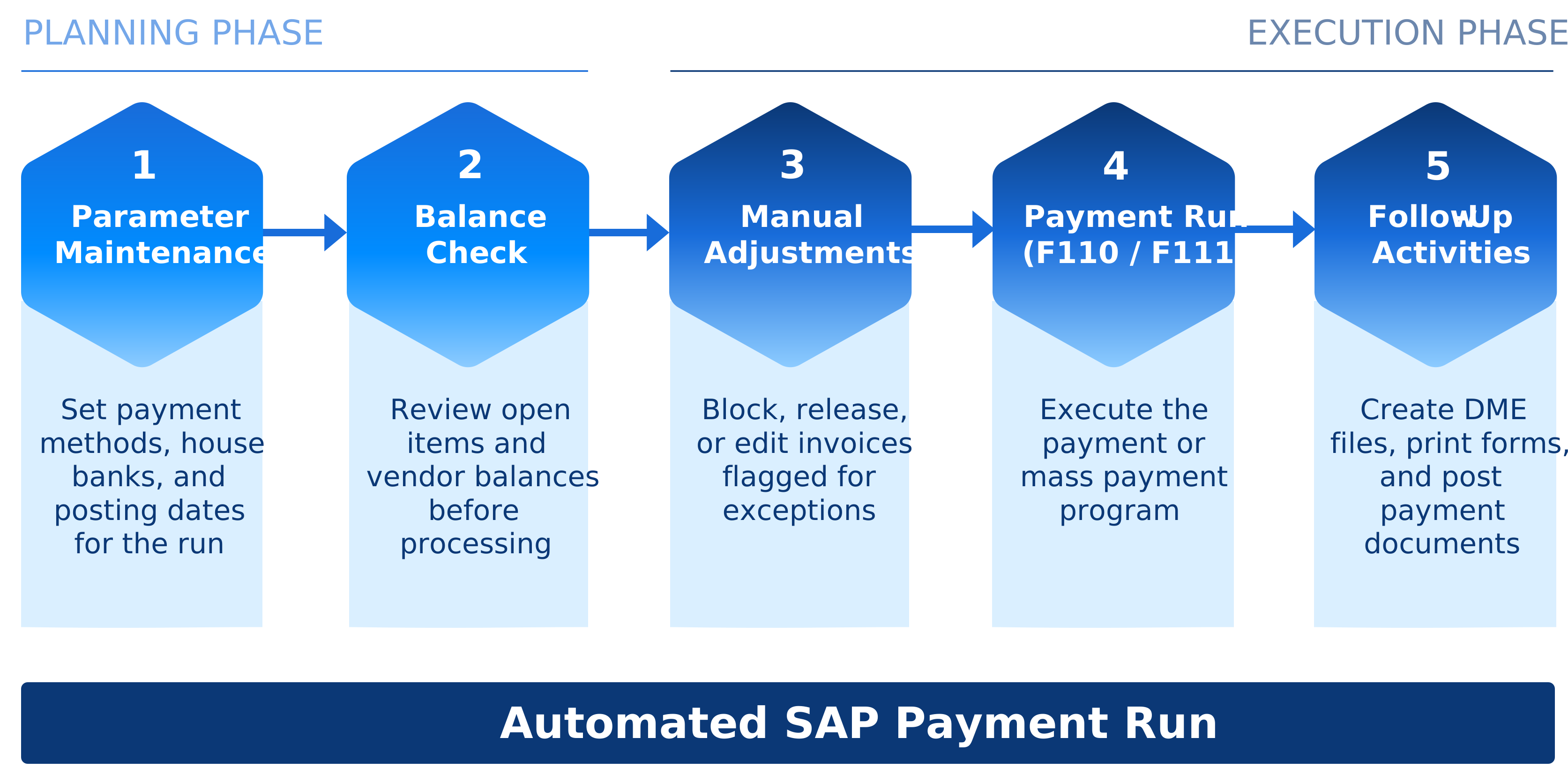
What is the SAP Payment Run?
The SAP payment run is a recurring process that executes payments based on predefined parameters and business rules. In SAP FI, for example, it processes vendor payments. Key SAP transactions include F110 for automatic payment processing and F111 for payment requests.
Depending on your SAP environment, payment automation can also support SAP HCM processes, where reliable execution is critical for payroll-related payments such as salaries and social security contributions.
Automate SAP Payment Runs from Preparation to Execution
Payment Inputs
- Defined ParametersRun date, company code, payment method
- Open ItemsDue payables and payment requests
- Master DataVendor and bank/payment data
- Business RulesValidation, approvals, controls
Automated SAP Payment Run
Orchestrate and execute payment runs with precision, visibility, and control.
Execution Outputs
- Payment ProposalProposed items for review
- Payment DocumentsPosted payment documents
- Payment MediaBank files and payment instructions
- Vendor PaymentsPayments in SAP FI
- Payroll-Related PaymentsSupported in SAP HCM
 SAP S/4HANAERP platform
Stonebranch Orchestrates the Full SAP Payment Process
SAP payment run automation ensures payment processes happen reliably, on time, and in coordination with the broader finance and IT ecosystem — not as an isolated SAP batch job, but as part of an end-to-end enterprise automation workflow.
Payment Inputs
Connect Payment Inputs
Coordinate the data, rules, and dependencies required before the payment run starts:
- Payment run parameters
- Open items and payment requests
- Vendor and payment master data
- Business rules, validations, and approvals
Execution
Automate SAP Payment Execution
Schedule and run SAP payment processes consistently across systems, business calendars, and execution windows:
- SAP FI payment run tasks
- F110 and F111 payment program activities
- Time- or event-based triggers
- Proposal runs and payment execution
Process Control
Monitor and Recover
Track each step of the payment process and respond quickly when issues arise:
- Status monitoring and centralized visibility
- Alerts and notifications
- Exception handling and automated recovery
- SLA monitoring and audit trails
Continuity
Continue Follow-Up Workflows
Trigger and monitor the activities that follow payment execution:
- Documentation and payment run records
- Reporting and file handling
- Downstream processing and related workflows
- Payment-related SAP HCM processes, where applicable

regio iT: Automated HCM Payroll and Follow-Up Activities for Municipal Customers with Stonebranch
Stonebranch helps SAP, finance, and IT operations teams:
- Reduce manual SAP and finance administration.
- Ensure payment runs execute on time.
- Avoid missed payment windows.
- Improve visibility into errors and exceptions.
- Coordinate SAP payment processes with related systems.
- Support time-critical, compliance-sensitive payment workflows.
- Create an audit trail showing who or what triggered the payment run and what happened afterward.
Explore Stonebranch Solutions for SAP Automation

BatchMan
An SAP-native workload automation solution that is form-fit for SAP end-users.
- Access Batchman as an add-on to your SAP instance. Looks and feels just like your SAP instance.
- Automate and orchestrate SAP’s full suite of applications.
- Best for SAP-centric automation.
Universal Automation Center:
A service orchestration and automation platform to automate SAP and beyond.
- Centralized automation for the entire enterprise.
- Automate any SAP application alongside the rest of your Hybrid IT environment.
- Best for SAP and non-SAP automation.
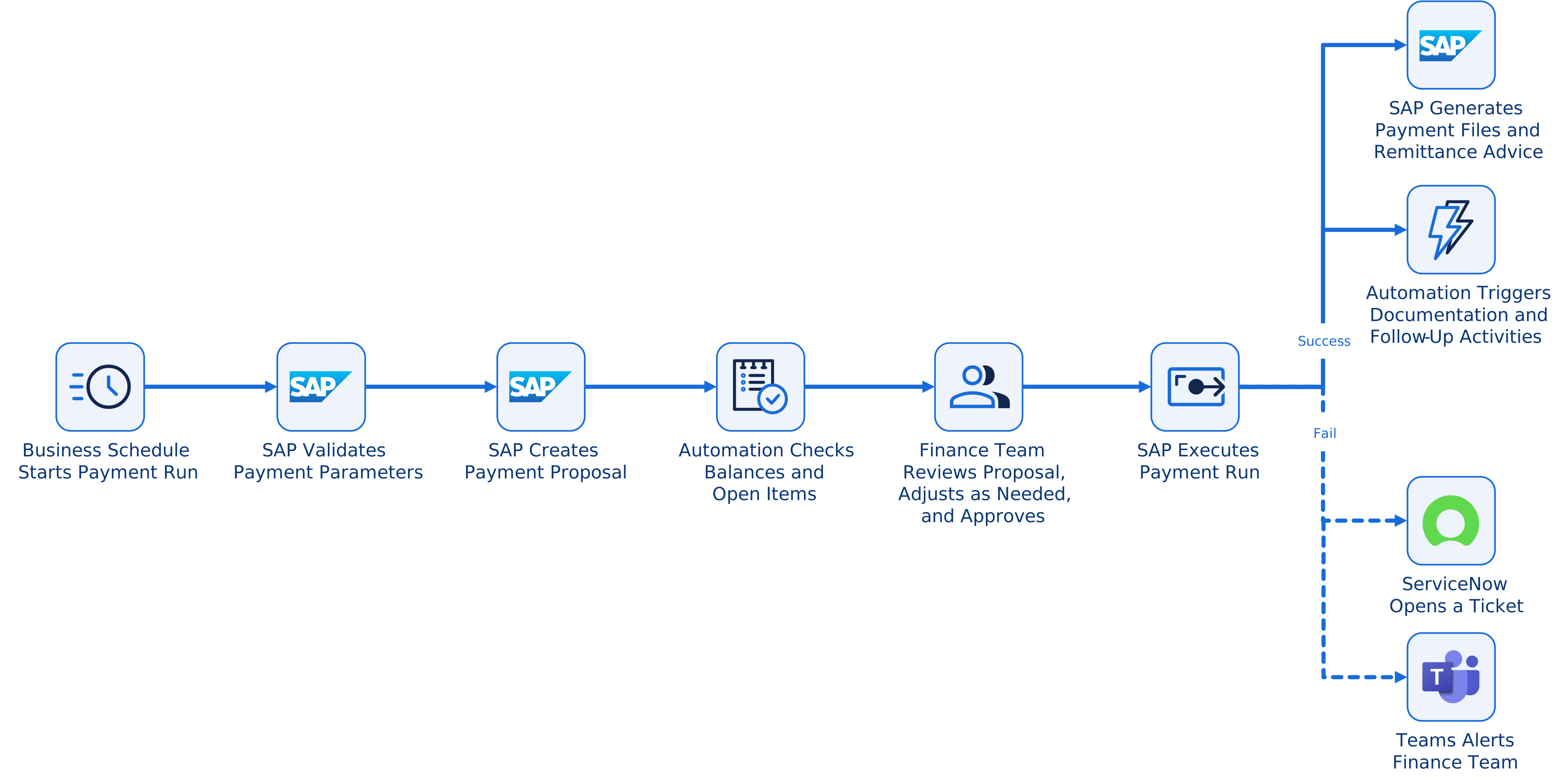
SAP Payment Run Automation Workflow Example
A finance operations team might automate this sequence:
- Business schedule initiates the SAP payment process.
- SAP validates the payment parameters.
- SAP creates the payment proposal.
- Balances and payment-relevant data are checked.
- Finance reviews the proposal and completes required adjustments.
- SAP executes the final payment run.
- Payment files and remittance advice are generated.
- Documentation and follow-up activities are triggered.
- The process is monitored centrally. If an issue occurs, a ServiceNow ticket is created and the finance team is notified in Microsoft Teams.
Frequently Asked Questions (FAQ)
Why automate SAP payment runs with a workload automation tool?
SAP payment runs often include repetitive, time-sensitive, and compliance-sensitive tasks. A workload automation tool helps reduce manual effort, orchestrate related tasks, monitor execution, alert the appropriate teams, and minimize errors throughout the payment run process.
What SAP transactions are used for SAP payment runs?
The SAP FI payment run is commonly associated with F110, the standard program for automatic payment processing, and F111, the program for processing payment requests.
Can SAP payment run automation also support SAP HCM?
Yes. SAP payment run automation can also support payment-related SAP HCM processes, including salary payments and social security contributions. This is especially valuable for payroll workflows that require reliable scheduling, monitoring, and error handling.
Why is the proposal run important?
The proposal run is a key step before the final payment run. It allows teams to review proposed payments, check payment-related data, and make any necessary adjustments before executing payments.
How does automation reduce errors in SAP payment runs?
Automation helps reduce errors by minimizing manual effort, validating workflow steps, monitoring jobs and processes in real time, and alerting the appropriate teams when issues occur.
Is SAP payment run automation only about SAP job scheduling?
No. SAP job scheduling is only one part of the process. A complete SAP payment run workflow can include preparation, proposal runs, validations, adjustments, execution, documentation, follow-up activities, monitoring, and cross-system orchestration.