UAC 8.0: What’s New in AI-Driven Automation and Customer-Led Enhancements
Explore what’s new in Stonebranch UAC v8.0, including Robi AI, event-driven automation enhancements, approval workflows, expanded integrations, and customer-driven updates for hybrid IT environments.
Stonebranch has released Universal Automation Center (UAC) v8.0, with a focus on advancing AI-driven automation across hybrid IT environments.
This release introduces Robi AI, bringing AI-assisted capabilities directly into the automation lifecycle — helping teams design, manage, and scale workflows more efficiently. Alongside these AI enhancements, UAC 8.0 includes numerous customer-driven updates that improve usability, flexibility, and platform-wide consistency.
Together, these updates reflect a continued shift toward more intelligent, event-driven automation while maintaining the control and reliability required for enterprise operations.
Key Takeaways
- UAC v8.0 delivers a high volume of customer-driven enhancements
- Introduction of Robi AI for AI-assisted automation and development
- Expanded event-driven automation with Universal Events and webhooks
- New approval tasks enable human-in-the-loop workflows
- Version diff support improves change tracking and governance
- Broader integration support, including Microsoft Graph for email notifications
- Continued investment in mainframe, cloud, and hybrid IT support
- Updated documentation experience improves usability and onboarding
Key Enhancements in UAC 8.0
Robi AI
UAC 8.0 introduces Robi AI, bringing AI-powered intelligence into enterprise workload automation and orchestration. Robi AI helps teams reduce operational complexity, accelerate issue resolution, and improve visibility across workflows, jobs, and data pipelines. By combining automation with AI-driven insights, organizations can move beyond static job scheduling to more intelligent, adaptive automation that enables faster decision-making, streamlined operations, and more efficient management of real-time, event-driven processes.
Robi AI Assistant: answers questions and provides guided explanations and support, based on UAC documentation and system data. This helps users get quick, contextual answers without needing to dig through documentation or switch between tools.
Analyze Now: reviews logs, job metadata, and execution history to perform root cause analysis (RCA) on workflow issues and recommend corrective action. Instead of manually piecing together information, teams can quickly understand what went wrong and what to do next.
Add AI Tasks to Automation Workflows: allows you to embed genAI-powered steps from ChatGPT, Gemini, Claude, Copilot, and SAP Joule directly into your broader workflows. This opens the door to more dynamic, intelligent workflows that can generate content, make decisions, and adapt in real-time. Learn more about AI workflow automation.
MCP Client/Server: supports using genAI tools as the front-end interface to interact with UAC. As a result, self-service users can interact with automation in a more natural, conversational way, in the platforms they’re already familiar with.
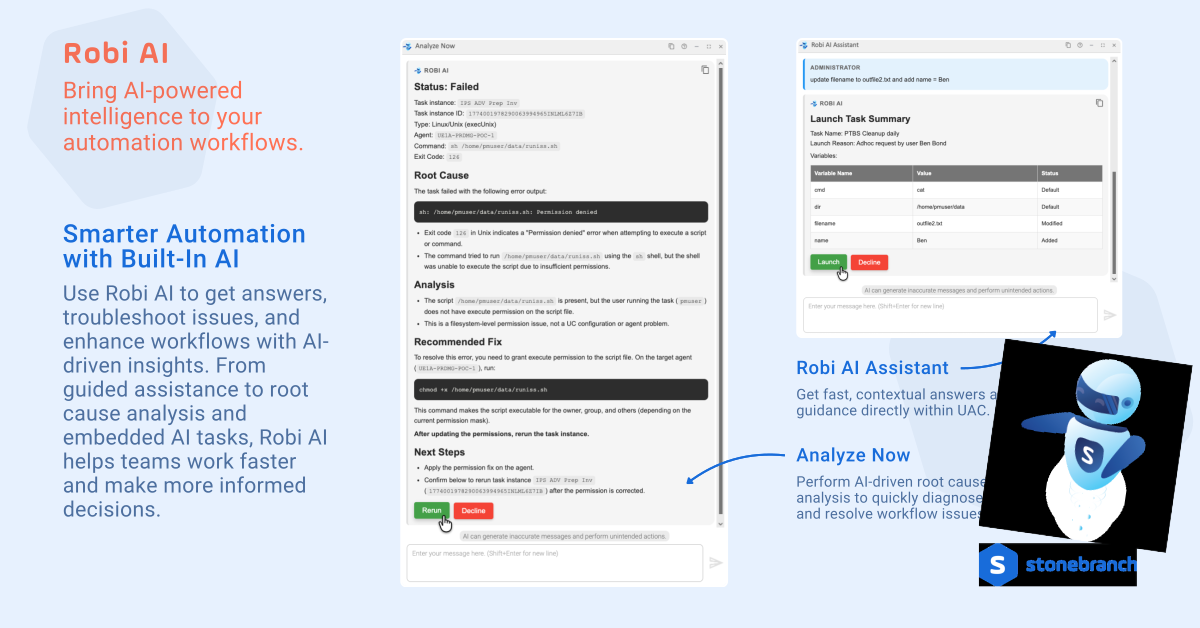
Robi AI does more than just offer assistance. It actively supports your troubleshooting and optimization workflows. Learn more about Robi AI in the UAC documentation.
Compare Record Versions (Version Diff Support)
UAC 8.0 enhances visibility into workflow and configuration changes with version diff support, making it easier to understand how records evolve over time.
Users can compare the current version of a record — such as a task, workflow, or trigger — with previous versions, or compare any two historical versions side by side. Differences are clearly highlighted at the field level, allowing teams to quickly identify what changed without manually reviewing configurations.
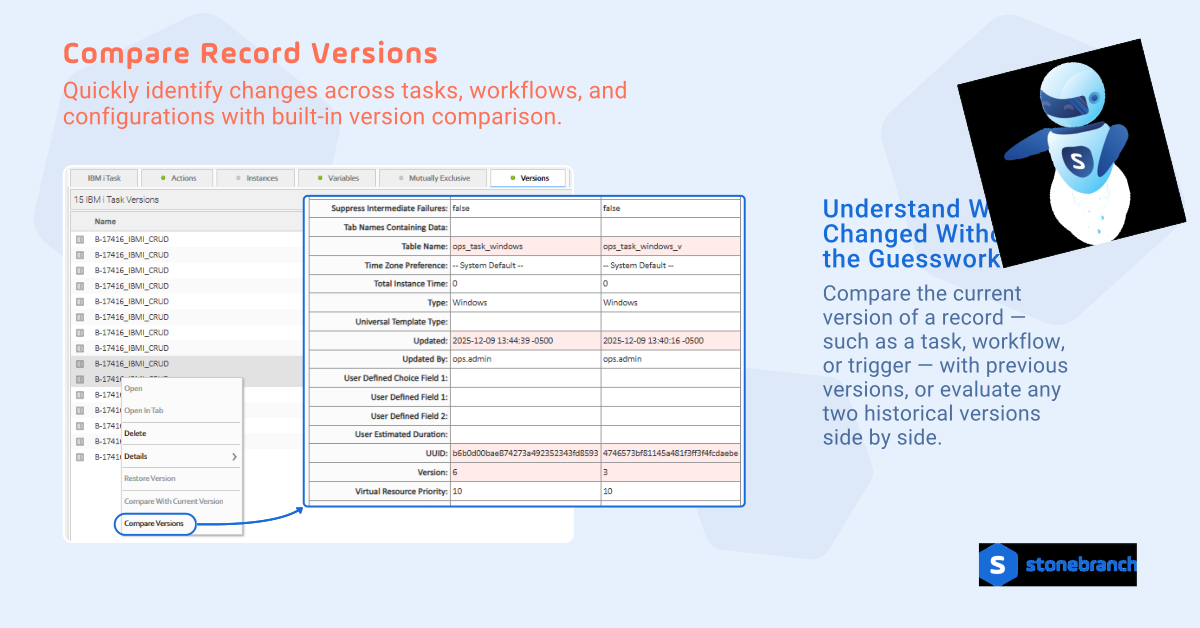
This builds upon UAC’s underlying record versioning system, which automatically captures and stores historical versions of user-defined records. Together, these capabilities help you:
- Identify changes quickly
- Reduce deployment risk
- Improve auditability
Approval Tasks: More Control and Visibility in Workflow Execution
UAC 8.0 introduces Approval Task enhancements that improve governance and visibility in approval-driven workflows. New workflow conditions include:
- Approved: triggers next steps only after approval.
- Approval Required: triggers actions when approval is needed.
In addition, UAC now supports Operational Memos for approval actions. Users can provide a reason when approving or rejecting a task, adding important context directly within the workflow. This information is captured in the task history and is also supported via the Approve/Reject Task Instance APIs.
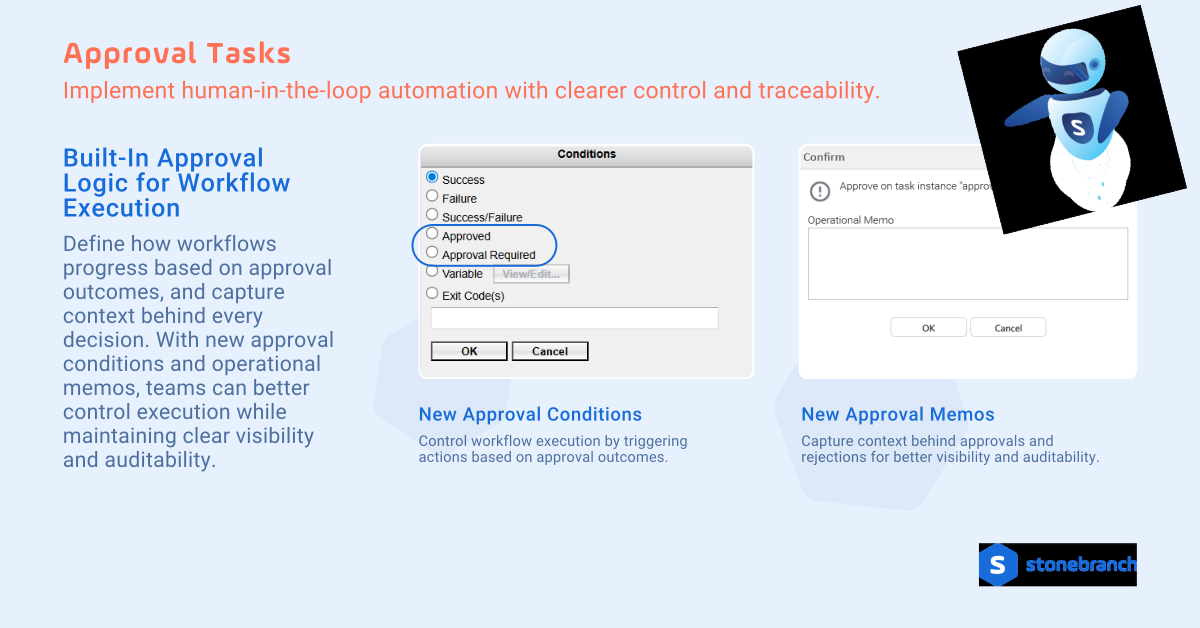
These enhancements streamline human-in-the-loop automation with stronger auditability, clearer decision tracking, and more precise control over how workflows progress.
Configurable Choice Fields for Any Task Type
Choice fields can now be configured across any task type, allowing for more standardized and flexible workflow design. Users can define a custom label, set a list of selectable values, and specify which task types require the field, adding a dropdown option alongside existing text fields. This helps reduce inconsistencies, improve usability, and ensure more controlled data input across workflows.
Configuration is managed through system properties, and once both the label and options are defined, the field becomes available within Task Details.
Universal Events and Webhooks
Event-driven automation enhancements to Universal Events and Webhooks provide more context and flexibility when triggering workflows.
Universal Events now include additional attributes for Task Status Change and Task SLA events, such as:
- Agent details (ID, name, hostname)
- Task time zone
- Workflow and top-level workflow names
This added context allows teams to build more precise, condition-aware automation based on real-time system activity.
Webhook URL Actions have also been enhanced with support for more variables, including:
- Universal Event attributes and event-specific variables
- System variables (e.g., cluster and environment identifiers)
- Global variables
Together, these updates make it easier to pass dynamic data to external systems, enabling more flexible integrations and responsive, event-driven workflows across hybrid IT environments.
Additional Platform Enhancements
UAC v8.0 includes a wide range of updates across the platform:
Integrations and APIs
UAC v8.0 introduces several updates to integrations and Web Service APIs, expanding connectivity and improving how users interact with automation programmatically. It’s easier than ever to integrate UAC with external systems, support automation-as-code initiatives, and improve visibility into automation processes across hybrid IT environments.
New integrations available for download from the Stonebranch Integration Hub include Azure OpenAI, Amazon Bedrock, Google Vertex AI, Guidewire, SAP iFlow, SAP Kyma, Microsoft Fabric, and Batchman.
In addition, outbound email connections now support Microsoft Graph, enabling more modern, secure communication across Email Tasks, notifications, and system alerts.
The Web Service API has also been significantly enhanced:
- New Report APIs: Retrieve and manage reports with new Read and List endpoints, including filtering options and JSON responses with optional field label mappings
- Expanded Task and Trigger APIs: Improved filtering, additional response fields (e.g., workflow context, timestamps), and greater control over returned data
- z/OS Job Step Control: New APIs allow users to read, select, and manage job steps for z/OS task instances
- Promotion Scheduling APIs: New endpoints for listing and rescheduling promotions, with support for updating targets, credentials, and timing
- Enhanced auditability: Additional timestamp and user tracking fields (created/updated) are now included across key API responses
Security and Platform Updates
Enhancements to agent/OMS business service registration controls help strengthen governance and control across distributed environments. A new Strict Business Service Membership option allows organizations to restrict agent registration so that agents can only connect to OMS servers aligned with their assigned business services
This helps enforce clearer boundaries across environments, improving security and operational consistency in multi-team or multi-tenant deployments.
Infrastructure and System Support
UAC 8.0 continues to expand support across enterprise platforms, with updates for IBM i, z/OS, and OMS architecture.
IBM i Enhancements
- Support for attaching task output (including JOBLOG) as a PDF in email notifications
- New “Attach Job Log” option for IBM i tasks
- Variable support across key job fields (e.g., job name, queue, output settings)
z/OS Updates
- TLS 1.3 support and z/OS 3.2 certification
- New APIs to read and manage job steps for re-run scenarios
- Ability to filter Agent File Monitor tasks by z/OS job name
OMS Updates
- Removal of network file share dependency through support for database replication architecture
- Support for OMS server IP address refresh, enabling dynamic DNS updates without restarting agents
- These enhancements improve flexibility, resilience, and compatibility across hybrid IT environments, while supporting more modern infrastructure and operational requirements.
Updated Documentation Experience
Stonebranch has also introduced an updated documentation experience designed to improve usability and accessibility. The updates include improved navigation, better organization, and enhanced search functionality.
Get Started with UAC 8.0
UAC 8.0 is available for download via the Stonebranch Customer Portal. Additional details on all the updates and enhancements can be found in the release notes for Universal Controller 8.0 and Universal Agent 8.0.
Start Your Automation Initiative Now
Schedule a Live Demo with a Stonebranch Solution Expert