


Product information "UAC Utility: UDMG Transfer"
Universal Data Mover Gateway (UDMG) is Stonebranch’s secure managed file-transfer (MFT) solution for orchestrating data movement across on-premises, cloud, and partner environments. It enables encrypted transfers, centralized management of credentials and endpoints, policy-based governance, and detailed auditing.
This integration embeds UDMG functionality directly into the Universal Automation Center (UAC), allowing users to initiate and monitor UDMG file-transfer pipelines as part of end-to-end automated workflows. Transfer execution and completion are reflected directly in the UAC task instance status, ensuring reliable workflow chaining and consistent security, logging, and access control without manual intervention.
Key Features
- Trigger UDMG file-transfer pipelines (UDMG v3.2+) directly from UAC task instances to perform secure PUT and GET operations within automated workflows.
- Propagate task-instance cancellations from UAC to UDMG, ensuring in-progress transfers are cancelled consistently on both sides.
- Automatically retrieve schedule or transfer execution details upon completion, exposing identifiers, statuses, and metadata as extension output for downstream workflow steps.
- Seamless integration with UAC security, auditing, and logging to provide unified governance across automation and data-movement activities.
UDMG Version Requirements
The extension detects the UDMG server version at launch and enables features accordingly. Basic transfers work against any supported server; the features below require a newer one, and selecting them against an older server fails the task with exit code 50 and a message naming the required version.
| Feature | Minimum UDMG Version |
| File filtering (Use Filter=Include) | 3.3.0 |
| Dry Run | 3.3.2 |
| Move (Delete Source After Transfer) | 3.4.0 |
What's New v1.3.0
Enhancements
- Added High Availability support: enabling Use High Availability replaces the single server URL with a list of UDMG servers, one per line, and a Cluster Mode selection matching the cluster's own configuration.
- Added Move (Delete Source After Transfer): when enabled, each source file is deleted after it transfers successfully, including every file matched by a filter. Nothing is deleted if the transfer fails or the transfer is a Dry Run. Requires UDMG 3.4.0 or later.
- Error responses from UDMG now carry the server's own explanation. The reported status, message code and detail are included in the extension output, so a failure such as a disabled pipeline names the pipeline instead of reporting only an HTTP status.
- The Transfer Schedule Statistics table now reports Total Bytes Transferred (bytes actually moved) alongside Total Bytes (the size of the matched files).
Fixes
- Total Bytes Transferred now correctly reports the sum of the bytes actually moved.
- The Pipeline dynamic choice field now always honors selected SSL Verification options.
- Listing the transfers of a wildcard schedule now requests a full page of results, substantially reducing the number of calls made while polling a schedule that matches many files.
| Extension Name: | ue-udmg-mft |
|---|---|
| Universal Template Name: | UDMG Transfer |
| Vendor Product: | UDMG |
| Version: | 1.3.0 |
| Vendor: | Stonebranch |
| Compatibility : | UC/UA 7.7 and above |
| Support: | Stonebranch Certified |
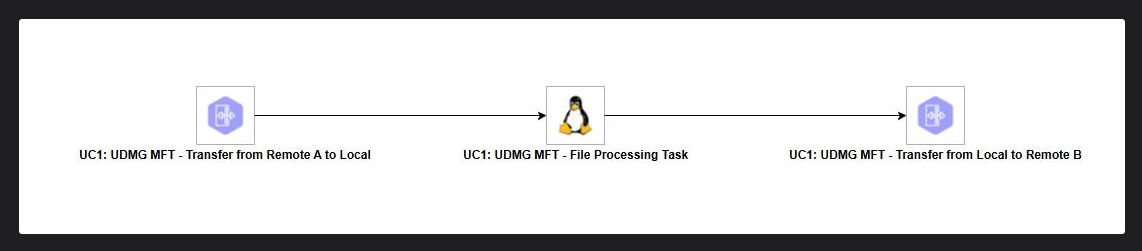
UC1: UDMG MFT - File Transformation and Delivery Workflow
Description
This workflow demonstrates how to retrieve a file from a remote SFTP server (Remote A) using the Stonebranch UDMG service, perform local processing or transformation on the file, and then deliver the processed file to a different remote SFTP server (Remote B).
Business Value
- Automate end-to-end file transformation pipelines without manual intervention
- Enforce governance, auditing, and credential management via UDMG for both inbound and outbound transfers
- Decouple ingestion, processing, and delivery steps for reusability and maintainability
- Reduce operational overhead by standardizing file transfer and transformation workflows
Technical Capabilities
- Inbound file transfer from Remote A using the ue-udmg-mft (UDMG Transfer) extension
- Automatic creation of variables exposing the local file path for downstream tasks
- Local file processing or transformation using standard tools or other extensions
- Outbound file transfer to Remote B via a second UDMG Transfer task
Workflow Tasks
| Task | Description |
|---|---|
| UC1: UDMG MFT - Transfer from Remote A to Local | Initiates a UDMG transfer to retrieve the source file from Remote A and store it locally. Exposes the local file path as an output variable. |
| UC1: UDMG MFT - File Processing Task | Reads the local file path from the previous task's output and applies the required transformation or processing logic. |
| UC1: UDMG MFT - Transfer from Local to Remote B | Initiates a UDMG transfer to deliver the processed file from the local path to Remote B. |