


Product information "Oracle Object Storage"
Oracle Cloud Infrastructure (OCI) Object Storage is a scalable, durable storage service for unstructured data of any type, kept as objects in buckets within an OCI tenancy. It is commonly used for data lakes, backups and archives, and for exchanging files between applications and partners.
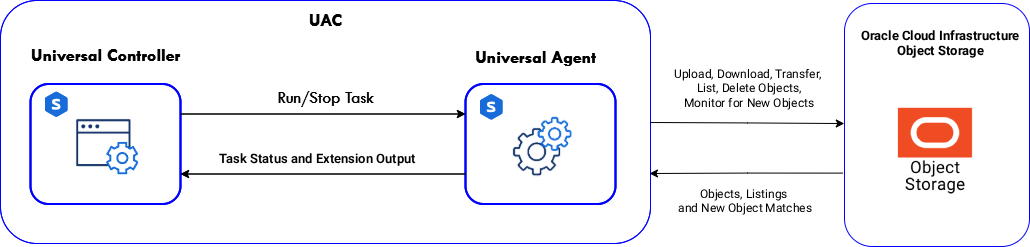
This integration transfers objects between a Universal Agent and Object Storage buckets, copies and moves them between buckets, lists and deletes them, and monitors a bucket for new objects, so file delivery, ingestion and housekeeping can be scheduled, triggered by arriving files, and chained with other tasks from the Universal Controller.
Key Features
- Upload, download, list and delete objects, selected by a prefix, a glob pattern and a recursion depth that mirrors directory trees in both directions.
- Transfer objects between buckets server-side, without routing the data through the agent.
- Copy or move objects, and choose how an existing object or file at the destination is handled: replace it, keep it, or write the new one under a timestamped or numbered name.
- Monitor a bucket for new objects and create a Universal Event for each match, carrying the bucket, namespace and object name, to trigger tasks and workflows as files arrive.
- Authenticate with an OCI config file on the agent or with API signing key details, with an optional key passphrase held in a UAC Credential, and pick buckets from a list filled from a compartment.
- Return transferred, skipped, listed, deleted and matched object names as Extension Output for downstream tasks.
What's New
Important Note: This integration replaces the Oracle Object Storage community solution (ue-cs-oracle-object-storage). Importing it replaces that template, and Monitor Objects creates the same oracle_storage_matched_file Universal Event, so existing event triggers stay bound. Actions and fields have changed, so existing task definitions must be reconfigured, and the List Buckets and Delete Bucket actions are not carried over. For more information, please refer to the integration documentation.
| Extension Name: | ue-oracle-object-storage |
|---|---|
| Universal Template Name: | Oracle Object Storage |
| Vendor Product: | Oracle Cloud Infrastructure Object Storage |
| Version: | 1.0.0 |
| Vendor: | Oracle |
| Compatibility : | UC/UA 7.8 and above |
Use Case 1: Validate an Inbound File Delivery and Archive it
Description
This workflow discovers the files delivered into a directory on a Universal Agent host, validates the newest delivery, and archives it with an entry in a manifest log retained across runs. A File Utility Task searches the inbound directory for entries matching the delivery pattern that were modified within a given time window and writes the result set as CSV, a second File Utility Task collects the metadata of the newest match and computes its checksum while validating it against an expected size and extension, and a Linux/Unix Task moves the validated file into an archive directory while appending its name, size, and checksum to the log.
The workflow demonstrates how File Utility turns the state of a filesystem into information the Universal Controller can act on. The search result determines which file the rest of the workflow processes, the validation decides whether processing continues at all, and the checksum computed on the Agent host travels forward as a variable. A file delivered by an external system becomes a monitored and verifiable step of a broader orchestration rather than an assumption.
Business Value
- Detection of files delivered by external systems without polling scripts or custom code maintained on the Agent host.
- Assurance that a delivery is complete before any downstream processing consumes it, so that a truncated or unexpected file fails the workflow instead of corrupting the result.
- An auditable record of every delivery processed, including its checksum, retained across executions.
- Early termination when nothing has been delivered, so that an empty window is reported rather than silently treated as success.
- Central scheduling and monitoring of filesystem driven workloads alongside the rest of the automation estate.
Technical Capabilities
- Searches a directory tree on a Universal Agent host with combined name pattern, entry type, size, and relative time filters, returning the result set as CSV both to STDOUT and to a file on the host.
- Sorts the result set by modification time so that the newest delivery is selected deterministically, and exposes its path through both the extension result and a task output field.
- Fails the workflow with a dedicated exit code when no entry matches the filters, allowing an empty result to gate the downstream tasks.
- Collects the full filesystem metadata of a single file, including size, timestamps, permissions, and entry type, and computes an MD5 or SHA-256 checksum of its contents.
- Validates a file against an expected minimum size and expected extension, failing with a dedicated exit code when the expectation is not met.
- Passes the discovered path, file name, size, and checksum to downstream tasks as Universal Controller variables, so that values computed on the Agent host are available to the rest of the workflow.
- Resolves every host path, Agent name, delivery pattern, and expectation from Universal Controller global variables, keeping the workflow portable across environments.
The solution shows that a directory on an Agent host can be treated as a source of events rather than a black box. What arrived, whether it is complete, and what was done with it all become part of the scheduled and auditable record of the Universal Automation Center.