


Product information "MS Dynamics 365 Business Central"
Microsoft Dynamics 365 Business Central is a cloud-native ERP solution by Microsoft which provides end-to-end management of financials, supply chain, operations, and project workflows through a fully integrated platform built on the Microsoft cloud. This Universal Extension enables Universal Automation Controller (UAC) to interact with Business Central's OData V4 and Business Central API v2.0, bringing job queue automation, endpoint orchestration, and operational visibility directly into automated workflows.
Key Features
- Orchestrate any Business Central OData endpoint via configurable POST requests with custom JSON payloads, enabling seamless integration with AL-defined actions and codeunits
- Restart failed or stalled job queue entries and optionally poll until completion, with live status updates pushed to UAC output fields throughout execution
- Inspect Business Central OData action parameters, allowing dynamic discovery of required payload fields before building automation tasks
- List all job queue entries with full details — status, description, category, parameter string, and object ID — to support monitoring, discovery, and disambiguation of entries sharing the same caption
- Dynamic dropdowns for company and job queue entry selection, populated live from the target Business Central environment at task configuration time
- Configurable retry logic, request timeouts, and SSL verification settings for robust, enterprise-grade connectivity
| Extension Name: | ue-ms-dynamics |
|---|---|
| Universal Template Name: | MS Dynamics 365 Business Central |
| Vendor Product: | Microsoft Dynamics 365 Business Central |
| Version: | 1.0.0 |
| Vendor: | Microsoft |
| Compatibility : | UC/UA 7.7 and above |
| Support: | Stonebranch Certified |
Use Case 1: Business Central Job Queue Entry Restart with Status Notification
Description
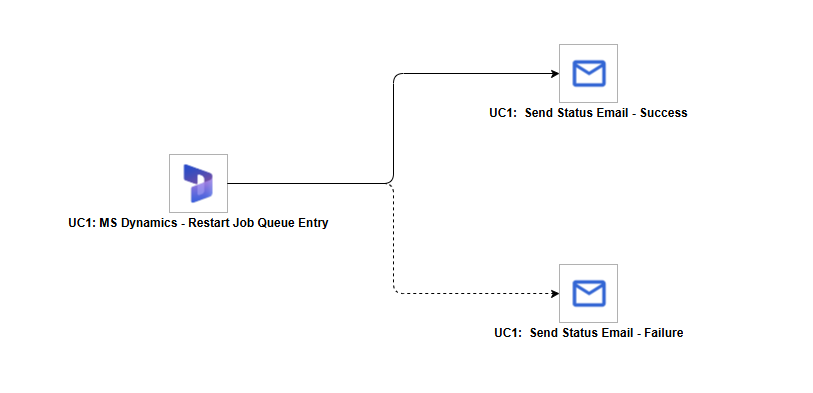
This workflow demonstrates automated restart of a Microsoft Dynamics 365 Business Central job queue entry with outcome-based email notification. Using the ue-ms-dynamics extension, a target job queue entry is restarted and polled until it reaches a terminal state. Once complete, the workflow branches based on the outcome — a confirmation email is dispatched on success and an alert email is dispatched on failure.
Business Value
- Automate recovery of stalled or failed Business Central job queue entries without manual intervention
- Deliver timely notifications to operations teams on every outcome, reducing mean time to awareness for ERP process failures
- Integrate Business Central job queue lifecycle management into broader enterprise automation workflows governed by Universal Controller
Technical Capabilities
- Job queue entry restart via ue-ms-dynamics extension using the Restart Job action with Wait for Completion enabled, polling the Business Central job queue log until a terminal state is reached
- Outcome-driven workflow branching: the success path and failure path are each triggered by the terminal state of the restart task
- Email notification dispatched on both success and failure paths using the UAC Email utility task
This use case demonstrates how the ue-ms-dynamics extension integrates into event-driven notification patterns, delivering end-to-end Business Central job queue automation with built-in outcome alerting directly from Universal Controller.
Workflow Tasks
| Task | Description |
|---|---|
| UC1: MS Dynamics - Restart Job Queue Entry | Restarts the configured Business Central job queue entry using the Restart Job action with Wait for Completion enabled, and polls the job queue log until the entry reaches a terminal state. |
| UC1: Send Status Email - Success | Sends a notification email confirming the job queue entry completed successfully. Triggered on task success. |
| UC1: Send Status Email - Failure | Sends an alert email notifying the team that the job queue entry transitioned to an Error state. Triggered on task failure. |